How to Improve Problem Solving Skills: A Practical Guide
Learn how to improve problem solving skills with actionable tips and proven strategies. Enhance your abilities today and tackle challenges effectively!
If you're looking to get better at solving problems, you need more than just a few quick tips. Forget the magic formulas. Real improvement comes from building a mental toolkit—a structured, yet flexible, way of thinking that helps you break down challenges, make smarter decisions, and ultimately, grow in your career. It’s about creating a systematic process you can lean on, no matter how complex the situation gets.
Why Most Problem-Solving Advice Fails
Let’s be honest: most of the advice out there on how to improve your problem-solving skills is just too vague to be useful. We’ve all heard it a thousand times—"think outside the box," "be more creative," or "break the problem down." While the sentiment is nice, these platitudes don't give you much to work with when you're staring down a real-world mess.

This guide is different. It treats problem-solving not as a fuzzy soft skill but as a core competency for your career and life. The goal isn't to hand you a one-size-fits-all solution, but to arm you with a collection of mental models and frameworks. True, lasting improvement comes from having a reliable approach you can adapt to any challenge you face.
The Real Cost of Unstructured Thinking
Without a systematic method, we all tend to fall back on bad habits. We jump to conclusions. We put band-aids on symptoms instead of digging for the root cause. We trust our gut when we should be looking at the data. This kind of unstructured thinking leads to wasted time, repeated mistakes, and missed opportunities. In a business setting, it can tank everything from team morale to the bottom line.
This is exactly why developing a reliable process is so crucial. It takes you from abstract theory to practical, repeatable action. Modern tools can also help speed things up. For instance, a platform like lets you apply powerful frameworks right from the get-go, using its AI to help you gather data, organize your thoughts, and even model potential outcomes.
The most sought-after skills by employers worldwide are analytical thinking and complex problem-solving. This demand persists even as automation and AI advance, highlighting the irreplaceable value of human cognition in navigating intricate challenges.
This isn't just a passing trend; it's a fundamental shift in what companies value. Research from the World Economic Forum reveals that seven out of ten companies globally see analytical thinking as essential. The same report found that by 2025, 50% of workers will have participated in reskilling, a big jump from 41% in 2023. It’s a clear sign that businesses are investing heavily in these skills. You can for more insights.
This guide will give you actionable strategies to build that mental toolkit and turn problem-solving into your greatest professional asset. We’ll walk through how to:
- Define Problems Accurately: Learn to look past the surface and pinpoint the real issue you need to tackle.
- Generate Creative Solutions: Move beyond the obvious answers by using structured ideation techniques.
- Make Data-Driven Decisions: Evaluate your options objectively so you can choose the best path forward with confidence.
- Build a Lasting Habit: Weave these skills into your daily routine for continuous, natural improvement.
How to Define the Problem You Are Actually Solving
It’s tempting to jump straight into fixing things. It feels productive, right? But in my experience, that’s the quickest route to solving the wrong problem entirely. The single most important skill you can build is learning to define what’s actually going on before you even think about a solution.
If you misdiagnose the problem, you're guaranteed to waste time, money, and morale on a "fix" that doesn't stick. Why? Because you were just patching up a symptom.
Think about a classic business headache: customer engagement suddenly tanks. The knee-jerk reaction is often to throw money at a new marketing campaign or roll out a discount. These actions target the symptom—low engagement—but completely miss the root cause. The real issue could be a buggy app update, a confusing new feature, or even a competitor who just launched something better.
Without a clear definition, you're just guessing. The best problem solvers I know fight that impulse and spend a good chunk of their time just taking the problem apart.
Moving Beyond Surface-Level Symptoms
To really get to the heart of an issue, you need a way to push past your own assumptions. One of the simplest and most effective tools for this is the 5 Whys technique. It’s a straightforward but surprisingly powerful way to drill down past the obvious. You just state the problem and ask "Why?" five times, digging a little deeper with each answer.
Let’s use that engagement drop example:
- 1. Why has engagement dropped? Customers are spending way less time on our platform.
- 2. Why are they spending less time? Our analytics show a massive drop-off right after the login screen.
- 3. Why is the drop-off happening there? We’re seeing a flood of user feedback that the new two-factor authentication is a nightmare.
- 4. Why is it a nightmare? The on-screen instructions are vague, and the SMS codes are taking forever to arrive.
- 5. Why are the instructions and the delivery system so bad? The feature was rushed to meet a quarterly deadline, and proper user testing got skipped.
See what happened? The problem started looking like a marketing issue, but the root cause was actually a broken development process. Now you have a concrete problem to solve: fix the authentication experience and, just as importantly, review your feature launch protocol.
The Dangers of Cognitive Traps
Our brains love shortcuts, which is great for day-to-day life but can be a disaster when you're trying to define a complex problem. We all fall into cognitive traps.
One of the big ones is confirmation bias, where we actively look for information that supports what we already believe. If you’re convinced the marketing team is slacking, you’ll find data to prove it while ignoring everything that points to a technical glitch.
Another trap is framing bias. The way a problem is presented to you dramatically influences how you'll try to solve it. If your boss says, "We need to cut costs by 15%," you'll start looking for things to slash. But what if they asked, "How can we become 15% more efficient?" Suddenly, you're looking for opportunities to innovate and improve processes, which might lower costs as a happy side effect. The frame creates the playing field.
The only way to beat these biases is to actively challenge your first instincts and bring in diverse data points.
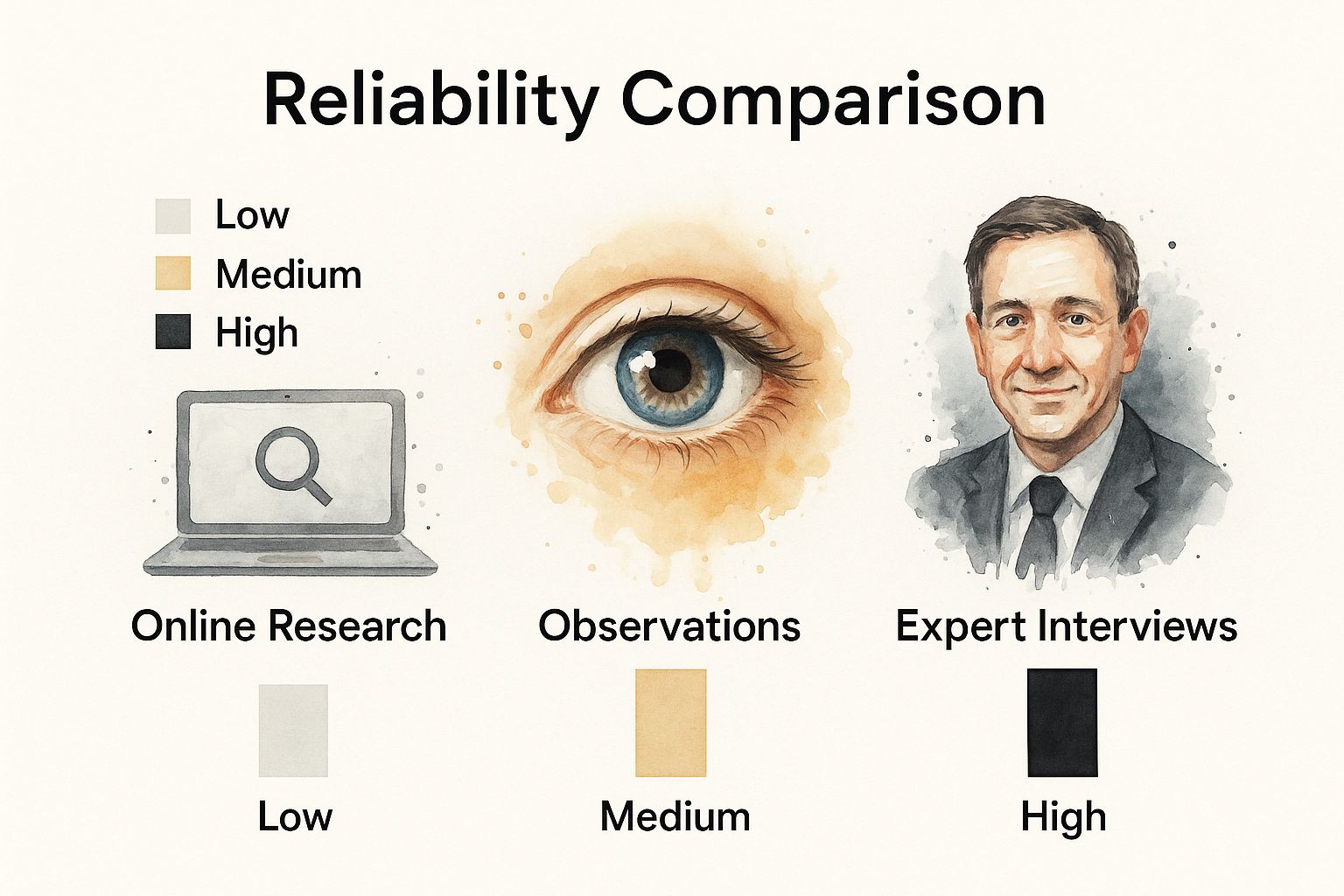
This image really drives home the point. If you’re only relying on a quick Google search, you're operating with low-reliability info. To get a true picture, you have to incorporate high-reliability sources like direct customer interviews or expert consultations.
Frameworks for Nailing Down the Problem
Choosing the right technique to define a problem depends on what you're facing. The 5 Whys is great for simple cause-and-effect chains, but other situations call for different tools. Here’s a quick comparison to help you pick the right approach.
Comparing Problem Definition Frameworks
Ultimately, the goal of these frameworks isn't just to fill out a template; it's to force you to look at the problem from angles you might otherwise miss.
Validating Your Problem Statement with AI
Once you have a solid hypothesis about the real problem, you need to back it up with data. This is where AI tools can be a massive help.
For instance, you could use Zemith's AI-powered analytics to process thousands of customer support tickets, feedback forms, and usage logs in seconds. You could ask it to "Show me all user complaints mentioning the login process in the last 30 days" and get immediate validation for the conclusion you reached with the 5 Whys.
This data-first approach pulls you out of the guessing game and makes sure your efforts are aimed at the right target. If you want to see more ways to use smart systems in your workflow, check out these excellent .
A well-defined problem is half-solved. Investing time in this initial stage prevents wasted effort and ensures your solutions create real, lasting impact.
By adopting a structured approach to problem definition, you'll shift from constantly putting out fires to making strategic, effective changes. It’s the foundational skill that makes everything else work, turning messy ambiguity into a clear path forward.
Building Your Toolkit for Creative Solutions
Once you’ve nailed down the actual problem, you're halfway there. Now for the fun part: turning that clarity into a flood of potential solutions. Too many teams jump straight into a free-for-all brainstorm, where the loudest or most obvious ideas tend to win out. To really get good at solving problems, you have to get more deliberate than that.
This is where divergent thinking comes into play. The goal isn't to find the one right answer just yet. Instead, you want to go wide and generate as many different ideas as you possibly can. Think of it as building an arsenal of options before you decide which weapon to use.

Unlocking Ideas with Mind Mapping
Mind mapping is a fantastic way to get out of the trap of linear, list-based thinking. You stick the core problem in the middle of a page and let your brain make connections, branching out with related thoughts, sub-ideas, and themes. It’s a visual process that mirrors how our minds naturally jump between concepts.
Let's say your problem is "reducing operational costs without tanking quality." A mind map would have main branches shooting out like "Technology," "Process Tweaks," "Vendor Relationships," and "Team Roles." From "Technology," you might get smaller branches like "Automate Repetitive Tasks" or "Consolidate Software Subscriptions." Suddenly, you can see the whole playing field at a glance.
This is where modern tools can really amplify the process. Using a platform like Zemith, your whole team can jump onto a collaborative digital whiteboard and build out the mind map in real-time. Every idea gets captured and organized instantly, so nothing brilliant gets lost in the conversation.
The Power of the SCAMPER Method
Ever feel like your team is stuck in a creative rut, recycling the same old ideas? That’s when you pull out the SCAMPER method. It’s a simple acronym that gives you seven different angles to attack a problem from, forcing you to break your usual thought patterns.
Let's apply it to that same cost-reduction challenge:
- Substitute: What if we swapped out our expensive CRM for a more affordable open-source one?
- Combine: Could we merge the quality check and final delivery steps into a single action?
- Adapt: What can we borrow from another field? Lean manufacturing is all about minimizing waste—how can we adapt those principles?
- Modify: Can we change the scale of our offering? Maybe create a "lite" version of our service at a lower price point.
- Put to another use: Are we sitting on untapped resources? Could our admin team take over basic social media updates?
- Eliminate: What can we just stop doing? That weekly status report that no one reads? Let's kill it and save everyone hours.
- Reverse: What happens if we flip the process? Instead of billing at the end, what if we invoiced upfront to improve cash flow?
This kind of structured questioning is a powerful way to jolt your brain out of its comfort zone.
Thinking Sideways with Lateral Thinking
Lateral thinking is all about ditching the logical A-to-B-to-C path and taking a leap to Z. It’s about asking provocative "what if" questions to break free from your assumptions.
For example: "What if we had a $0 budget to solve this?" An impossible constraint like that immediately forces you to get creative. You start thinking about partnerships, community engagement, or bartering—ideas that would never surface otherwise.
These aren't just feel-good exercises; they're becoming critical business skills. A 2025 global survey of 4,000 professionals found a huge emphasis on human-centric skills like creativity. In fact, nine out of ten executives now believe these abilities are more important than ever in a world increasingly shaped by AI. You can explore a variety of to expand your toolkit even further.
Building a diverse portfolio of solutions is a strategic advantage. It ensures that when you move to the decision-making phase, you're choosing from the best possible options, not just the most obvious ones.
Ultimately, mastering techniques like Mind Mapping, SCAMPER, and Lateral Thinking gives you a systematic way to produce a wealth of high-quality ideas for any challenge that comes your way.
Making Decisions Without The Guesswork
It’s easy to feel a rush of productivity after a solid brainstorming session leaves you with a long list of potential solutions. But that's only half the job. An idea, no matter how brilliant, is just a possibility until you have a clear, logical way to choose the best one and turn it into a concrete plan of action.
This is the critical pivot point where you move from creative chaos to structured decision-making. Relying on a gut feeling here is a trap many teams fall into. To make real progress, you need objective frameworks that help you stack your options against what truly matters, see the risks, and make a choice you can stand behind with data.
Using a Priority Matrix to Find Quick Wins
Let's be honest: not all solutions are created equal. Some are easy lifts that deliver huge rewards, while others are resource-draining monsters that offer very little in return. The Priority Matrix, which you might know as the Eisenhower Matrix, is a brilliantly simple tool for cutting through the noise. It helps you sort your options based on two things: impact and effort.
You simply plot each idea on a four-quadrant grid:
- High Impact, Low Effort (Quick Wins): These are your green lights. Jump on them immediately. They deliver the most value for the least work and build incredible momentum.
- High Impact, High Effort (Major Projects): These are the big, strategic moves. They’re worth the investment, but they demand careful planning and resources.
- Low Impact, Low Effort (Fill-ins): Think of these as "if we have time" tasks. They're fine to tackle when there's a lull, but don't let them distract you from what’s important.
- Low Impact, High Effort (Time Sinks): Avoid these at all costs. They will drain your energy, budget, and morale for almost no payback.
This visual exercise instantly clarifies where you and your team should be focusing your energy first. It’s a fast and incredibly effective way to get unstuck.
Conducting a Cost-Benefit Analysis
When you're looking at solutions that require a serious investment of time, money, or both, you need to dig a little deeper. A Cost-Benefit Analysis (CBA) gives you a systematic way to weigh the financial and operational trade-offs of each option.
For a CBA, you meticulously list out all the potential costs—both direct and indirect—and pit them against all the potential benefits, tangible and intangible. Say you’re picking a new software vendor. Your comparison might look something like this:
By putting a number on these factors wherever you can, you start to see a clear return on investment for each choice. A decision that felt subjective and murky suddenly becomes an objective, financial one, which is far easier to explain and defend to stakeholders. To keep this kind of analysis organized and accessible for future decisions, it's wise to adopt solid .
Mapping the Future with Decision Trees
What about those really knotty problems, the ones with multiple stages and a lot of "what ifs"? For those, a Decision Tree is a fantastic visualization tool. It lets you map out the different paths your decision could take and see the potential ripple effects of each choice.
Let’s imagine you’re debating whether to build a new feature in-house or outsource its development.
- Your starting point—the first node—is the core decision: Build vs. Outsource.
- From there, each option branches out into potential outcomes. The "Build" branch, for example, might split into "Successful Launch" and "Delayed Launch."
- Next, you assign a probability to each outcome (e.g., maybe you estimate a 70% chance of success if you build it yourself) and calculate the potential financial payoff or loss for each one.
By working your way down the tree, you can calculate the expected value of each path. This process shines a light on the option with the highest probability of leading to a great outcome.
Making data-driven decisions isn't just about crunching numbers. It's about building a compelling, evidence-based story that gives your team confidence in the path forward.
This is where a tool like Zemith can be a game-changer. You can use its AI to model these different scenarios, track the key metrics for each option, and pull all of your analysis into one place. This helps you build an undeniable case for your chosen solution, turning a tough call into a clear, strategic move.
Turning Problem-Solving Into a Daily Habit
Becoming a go-to problem-solver isn't about some grand, one-time transformation. It’s a skill, and like any other, it’s built through consistent, deliberate practice. Think of it like training a muscle; your ability to dissect and conquer complex challenges gets stronger with every daily workout. Here’s how you can weave that practice into your professional life, making it an ingrained habit instead of a chore.

The trick is to move beyond just reading about problem-solving and start doing it. Waiting for a massive crisis to practice your skills is like waiting until marathon day to start training. It’s the small, consistent efforts that build the mental endurance you need for the high-stakes stuff.
Get Your Hands Dirty with Active Learning
Passive learning, like skimming articles, will only get you so far. To really sharpen your skills, you have to get your brain actively involved. The good news is this doesn't require a huge time commitment—just a small shift in how you consume information.
A great place to start is with business case studies. You can find tons of them online for free, detailing the real-world challenges companies have faced. Instead of just reading to see what happened, hit pause. Ask yourself, "What would I have done here? What information would I have hunted down? Which frameworks would I have used to structure my thinking?"
This simple exercise trains your brain to break down complicated scenarios and apply a structured approach. The more you do it, the more second-nature it becomes when you’re facing your own professional hurdles.
Sharpen Your Logic with Puzzles and Games
Don't dismiss logic puzzles and strategy games as just a way to kill time. They're actually fantastic training grounds for your problem-solving mind. Things like Sudoku, chess, or even a complex board game force you to think several steps ahead, weigh consequences, and pivot your strategy when new information comes to light.
These games are sneakily teaching you to:
- Spot patterns in what looks like chaos.
- Manage limited resources to hit a target.
- Weigh multiple potential moves and their likely outcomes.
- Adapt on the fly when your perfect plan gets wrecked.
Just 15-20 minutes a day with a logic puzzle can hone the exact cognitive skills you need to navigate a tough negotiation or debug a tangled project plan.
Master the Art of Thinking Backward
One of the most potent mental models out there is inversion, and it's criminally underused. Instead of asking, "How do I achieve my goal?" you flip it on its head: "What would absolutely guarantee this fails?"
It might feel a bit pessimistic at first, but thinking through all the ways a project could implode is an incredibly effective method for spotting weaknesses and obstacles in your plan before they become real problems.
By systematically identifying what you want to avoid, you bring incredible clarity to the steps you absolutely must take. Inversion shines a spotlight on blind spots that are totally invisible when you're only focused on the sunny path forward.
Let's say you’re launching a new product. Don't just plan for success. Ask, "What would make this launch a complete and utter disaster?" The answers—a buggy product, confusing marketing, terrible customer support—instantly become your checklist of what to obsess over. This simple shift moves you from being a reactive firefighter to a strategic risk manager.
Keep a Decision Journal to Learn from Yourself
Great problem-solvers don't just have good experiences; they learn from them. A decision journal is a simple yet profound tool for making that happen. Whenever you make a significant decision, jot down what you decided, your reasoning, what you expect to happen, and even how you feel about it.
Later, you come back to the entry and compare your expectations to reality. This practice creates a powerful feedback loop that calibrates your judgment over time. You'll start to see patterns in your own thinking, catch your biases in action, and truly understand the ripple effects of your choices.
Journaling also makes you better at explaining your thought process—a crucial skill when you need to get a team or stakeholder on board. If you want to get better at structuring your thoughts on paper, our guide on how to has some fantastic strategies.
There's a real gap between knowing and doing. According to the OECD's 2023 Survey of Adult Skills, only about 5% of adults reach the highest proficiency in adaptive problem-solving. This isn't just a vanity metric; those with stronger skills see tangible rewards, like 7% higher hourly wages. You can and see the bigger picture.
By building these small but mighty habits into your daily routine, you'll steadily develop the skills to tackle any problem with confidence and precision.
Common Questions About Problem Solving Skills
As you start putting these strategies to work, you're bound to run into a few hurdles. That’s perfectly normal. Getting better at anything is a cycle of learning, doing, and tweaking your approach. Here are some of the most common questions that pop up, with practical answers to keep you moving forward.
How Can I Practice If My Job Isn't Challenging?
This is a great question, and one I hear a lot. You don't have to wait for a five-alarm fire to hone your skills; you can create your own challenges.
Start by looking at the everyday processes you or your team follow. Ask a simple question: "How could we make this just 10% better?" That small constraint forces you to think critically and can uncover some surprisingly meaty problems to solve.
Beyond your daily tasks, raise your hand for cross-functional projects. Getting outside your bubble exposes you to entirely new ways of thinking and problems you've never seen before. Even hobbies like chess, complex board games, or a personal coding project can be fantastic training grounds for strategic thinking.
What's the Biggest Mistake People Make?
Jumping to a solution way too early. It’s the single most common trap I see people fall into. We're all wired for quick wins, and cognitive biases like confirmation bias—where we cherry-pick data that confirms our first hunch—don't help.
But this rush to action almost always means you're just slapping a bandage on a symptom, not addressing the root cause. Of course, the problem just comes back, sometimes worse than before. The best problem-solvers I’ve ever worked with are incredibly patient on the front end. They spend a significant amount of time just defining and deconstructing the problem from every possible angle before they even whisper the word "solution."
How Do I Show Off My Problem-Solving Skills in an Interview?
Telling an interviewer "I'm a great problem-solver" is like a comedian saying "I'm funny." It means nothing. You have to show them with a good story.
The best framework for this is the STAR method:
- Situation: Briefly set the scene. What was the challenge you were up against?
- Task: What was your specific goal or responsibility in that situation?
- Action: Walk them through the specific, logical steps you took. This is your chance to shine. Mention frameworks you used, like the 5 Whys, or how you built a Priority Matrix to focus your efforts.
- Result: What happened? Share the measurable, positive outcome. Numbers are your best friend here (e.g., "we cut down support tickets by 25% in the first quarter").
This storytelling structure gives them concrete proof of how you think. It turns a generic claim into a powerful, memorable example of your skills in action.
Will AI Tools Replace Human Problem-Solvers?
Not a chance. Think of AI as a powerful collaborator, not a replacement. Tools like are incredible for crunching massive amounts of data, spotting patterns a human might miss, and modeling outcomes at scale. They handle the heavy lifting of analysis so you can focus on the bigger picture.
But AI can't replicate core human abilities. It can't frame the right question to begin with. It lacks ethical judgment, creative intuition for truly novel ideas, and the empathy needed to communicate a vision and get people on board.
The future isn't about humans versus AI; it's about humans with AI. We'll use these tools to supercharge our own cognitive abilities, letting us solve bigger, more complex problems than ever before.
Ready to stop juggling dozens of apps and start solving problems more effectively? Zemith integrates a full suite of AI tools into one seamless workspace, from advanced research and document analysis to creative ideation and coding assistance. Simplify your workflow and unlock your full potential by visiting to see how.
Explore Zemith Features
Every top AI. One subscription.
ChatGPT, Claude, Gemini, DeepSeek, Grok & 25+ more


Always on, real-time AI.
Voice + screen share · instant answers
What's the best way to learn a new language?
Immersion and spaced repetition work best. Try consuming media in your target language daily.
Voice + screen share · AI answers in real time
Image Generation
Flux, Nano Banana, Ideogram, Recraft + more

Write at the speed of thought.
AI autocomplete, rewrite & expand on command
Any document. Any format.
PDF, URL, or YouTube → chat, quiz, podcast & more
Video Creation
Veo, Kling, Grok Imagine and more

Text to Speech
Natural AI voices, 30+ languages
Code Generation
Write, debug & explain code
Chat with Documents
Upload PDFs, analyze content
Your AI, in your pocket.
Full access on iOS & Android · synced everywhere
Your infinite AI canvas.
Chat, image, video & motion tools — side by side

Save hours of work and research
Transparent, High-Value Pricing
Trusted by teams at


Free
No credit card required
- 100 credits daily
- 3 AI models to try
- Basic AI chat
Plus
- 1,000,000 credits/month
- 25+ AI models — GPT, Claude, Gemini, Grok & more
- Agent Mode with web search, computer tools and more
- Creative Studio: image generation and video generation
- Project Library: chat with document, website and youtube, podcast generation, flashcards, reports and more
- Workflow Studio and FocusOS
Professional
- Everything in Plus, and:
- 2,100,000 credits/month
- Pro-exclusive models (Claude Opus, Grok 4, Sonar Pro)
- Motion Tools & Max Mode
- First access to latest features
- Access to additional offers
What Our Users Say
Great Tool after 2 months usage
"I love the way multiple tools they integrated in one platform. Going in the right direction."
— simplyzubair
Best in Kind!
"The quality of data and sheer speed of responses is outstanding. I use this app every day."
— barefootmedicine
Simply awesome
"The credit system is fair, models are perfect, and the discord is very responsive. Quite awesome."
— MarianZ
Great for Document Analysis
"Just works. Simple to use and great for working with documents. Money well spent."
— yerch82
Great AI site with accessible LLMs
"The organization of features is better than all the other sites — even better than ChatGPT."
— sumore
Excellent Tool
"It lives up to the all-in-one claim. All the necessary functions with a well-designed, easy UI."
— AlphaLeaf
Well-rounded platform with solid LLMs
"The team clearly puts their heart and soul into this platform. Really solid extra functionality."
— SlothMachine
Best AI tool I've ever used
"Updates made almost daily, feedback is incredibly fast. Just look at the changelogs — consistency."
— reu0691