


Every top model, with tools built in.
Search the web, run deep research, read files, create images and run code with GPT, Claude, Gemini, Grok and more.
Learn how to chat with your documents using Zemith. Generate summaries, flashcards, and podcasts while keeping your data secure and answers verified.
You've got fifteen browser tabs open, three PDFs in Downloads, and a spreadsheet that somehow resembles the Matrix. A colleague asks for one figure from last quarter's report, so you search, skim, open another tab, and forget why you started. By the time you find the answer, the original question has become a small archaeological site.
Chat with your documents changes that working pattern. Instead of treating files as static archives, you can ask questions in ordinary language, compare sources, extract decisions, and reshape dense material into something practical. The useful version of this workflow isn't “upload a PDF and trust whatever appears.” It's a searchable workspace built around retrieval, evidence, privacy, and formats that fit the way you work.
A researcher might have a technical paper, a dataset description, meeting notes, and a draft proposal open at the same time. A student might be moving between lecture slides, a textbook chapter, and a revision guide. A marketing team might be hunting through customer interviews and campaign reports for the same insight they've already found twice but failed to label properly.
The common problem isn't a lack of information. It's the friction between information and action. Microsoft's 2025 Work Trend Index found that employees were interrupted by a meeting, email, or chat roughly every two minutes during core working hours, and that the total reached 275 interruptions per day when activity outside the standard workday was included. In that environment, every app switch has a cost, even when the switch itself takes only a moment.
Conversational document access gives those files a shared working context. You can ask, “Which requirements changed between these two specifications?” rather than remember the exact filename, page, or keyword. You can follow up with, “What evidence supports that difference?” and then turn the answer into notes, questions, or a short explanation.
The distinction matters. A basic search tool finds matching words. A document assistant can help connect related passages across several sources, provided its retrieval system finds the right evidence. That makes it useful for research, studying, requirements review, content planning, and any task where the answer is distributed across documents.
The best workflow keeps the original files available while bringing questions and outputs into one place. You're not replacing judgment with a chat bubble. You're reducing the manual work of locating, sorting, and reformatting information so your attention stays on interpretation.
Practical rule: Use document chat to shorten the path to evidence, not to remove the evidence from the process.
Before asking a quarterly report for life advice, it helps to understand what happens behind the interface. Production-grade document chat commonly uses retrieval-augmented generation, or RAG. The system parses a file, breaks it into sections, turns those sections into vector embeddings, indexes them, retrieves passages related to your question, and supplies those passages to a language model as evidence.
Think of it as a research assistant paired with a writer. The research assistant searches the filing cabinet and selects relevant notes. The writer turns those notes into a readable response. If the assistant retrieves the wrong notes, the writer can still produce a polished answer, but polish won't repair a missing source.
Documents aren't usually handed to the model as one enormous block. They're divided into chunks so the retrieval layer can identify useful passages. In the baseline setup described by the Unstructured Document Analysis benchmark, documents were divided into approximately 3,000-character chunks, about 500 words, with 10% overlap.
Overlap helps when an answer crosses a boundary between chunks, but it also increases the material that must be indexed and considered during retrieval. Chunk size isn't a magic setting. A legal clause, a table row, and a heading-led technical procedure may each need different structural treatment.
The ingestion stage matters just as much. Poor OCR, broken tables, missing headings, or lost page metadata can damage answer quality before the language model sees anything. For scanned reports and complex PDFs, document parsing is not a boring prelude. It's part of the reasoning system.
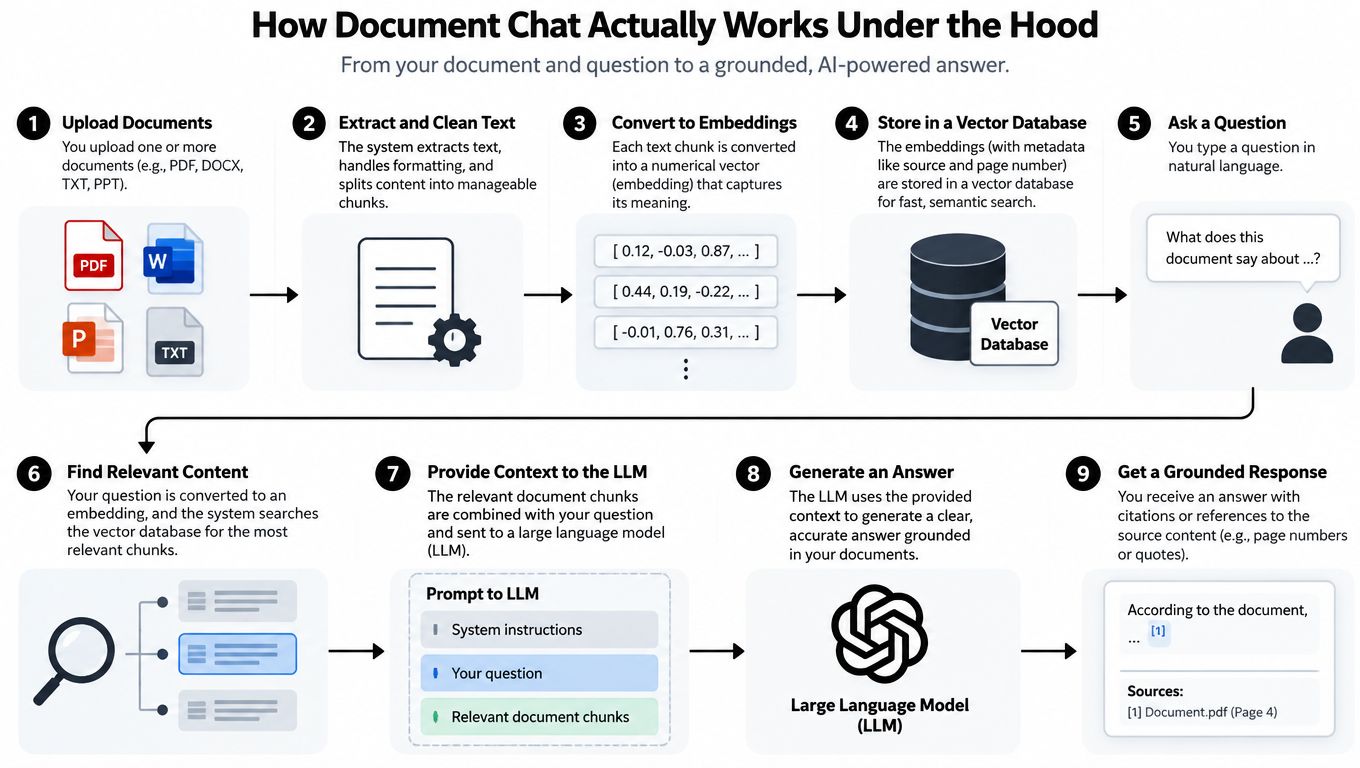
Long context doesn't eliminate retrieval. The Loong benchmark evaluates multi-document question answering across context ranges from 10–50K tokens through more than 200K tokens. In its reported experiments, even retrieval with top-k=50 recovered all required documents in only 64% of cases, with lower recall for individual evidence pieces.
That result makes the practical lesson clear. Throwing more passages into a prompt can create noise and still miss the decisive detail. Document-level routing, metadata filters, section-aware chunking, and iterative retrieval are more useful than just choosing a model with a larger context window.
For a plain-language overview of the product workflow, see this guide to AI assistants for documents. Then watch the process visually:
A chat answer is only one possible output. The more useful question is: What form will help you remember, explain, or act on this information?
Start with a focused source set. Add the report, paper, handbook, or collection of files you need for the task. Ask for a concise orientation summary first, then move to targeted questions such as:
This sequence prevents the common mistake of asking for a grand summary before you know what you're trying to do. A summary is useful for orientation, but it can flatten caveats and hide disagreements between sources. For a practical look at this use case, explore AI document summarization.
Dense material often becomes easier to use when you change its format. Zemith's Document Assistant can turn source material into summaries, quizzes, flashcards, and podcasts, which gives you several ways to process the same underlying content.
A researcher can generate a short audio overview before a meeting, then return to the source for exact passages. A student can create flashcards from definitions and mechanisms, use a quiz to expose weak spots, and keep the original reading open for correction. A content creator can turn a research packet into structured notes before drafting, instead of asking an AI to leap directly from raw files to publishable prose.
The Fluidwave AI assistant review is useful if you're comparing broader workplace assistant workflows, but document chat deserves its own evaluation criteria. Ask whether the tool handles multiple files, preserves source context, supports follow-up questions, and lets you convert information into outputs that fit your routine.
Podcasts are especially handy for passive review, but they shouldn't become a substitute for verification. Audio is excellent for getting the shape of an argument into your head. It's a poor place to inspect a footnote, distinguish two similar figures, or check whether a statement came directly from the source.
AI can be a confident liar. The danger isn't only an obviously ridiculous answer. The more expensive mistake is a smooth response that combines a real passage with an unsupported inference and presents the whole thing as settled fact.
The evaluation tradition behind document question answering gives us better language for this problem. Precision asks how much of the retrieved material is relevant. Recall asks how much relevant material the system found. These measures were described in work by Allen Kent and colleagues in 1955, while the Cranfield studies established controlled, repeatable retrieval experiments with early findings appearing in 1962, as summarized in this history of information retrieval.
A trustworthy workflow checks more than fluency. For every important claim, ask:
Zemith's fact-checking workflow is a natural place to apply this habit. The AI fact-checking guide focuses attention on tracing claims back to source material instead of rewarding the answer that sounds most certain.
Evidence rule: If you can't point to the passage that supports a high-impact claim, treat the claim as unverified.
The risk is especially serious in compliance, engineering, finance, education, and research. NIST's Generative AI Profile, published on July 26, 2024, is designed to help organizations identify generative AI risks and choose risk-management actions aligned with their goals. In practical terms, preserve the source, show the evidence, mark interpretation clearly, and require human review before a consequential conclusion gets reused.
Uploading a document feels harmless until the document contains customer details, internal forecasts, employee records, contract terms, or unpublished research. Then the chat history, generated summary, extracted table, and exported notes become part of the confidentiality problem too.
Privacy isn't solved by a label that says “private.” A responsible document-chat system needs clear answers about workspace isolation, permissions, encryption, retention, deletion, audit logs, and administrator visibility. It should also prevent a user from retrieving content from a file they're not authorized to access, even when that file sits in the same broader workspace.
The access question is operational, not philosophical. Can a response expose material from another user's file? Does deleting a document remove it from indexes and conversation history? Are generated summaries protected at the same permission level as the original? Can an administrator identify which passages influenced an answer?
A source document is only one data asset. A chat transcript can contain sensitive excerpts. A flashcard set can preserve confidential facts in a more portable form. A podcast may make private information easier to hear in a shared environment. Treating these outputs as disposable is how a neat productivity workflow turns into a messy compliance incident.
Adobe's discussion of security for generative AI in document productivity highlights risks involving confidentiality, document authenticity, metadata tampering, misleading generated content, and inadequate access controls. The same concern applies to voice workflows. Teams looking at audio-based work should also review safe voice lab notebook practices, particularly around what gets stored, shared, and reused.
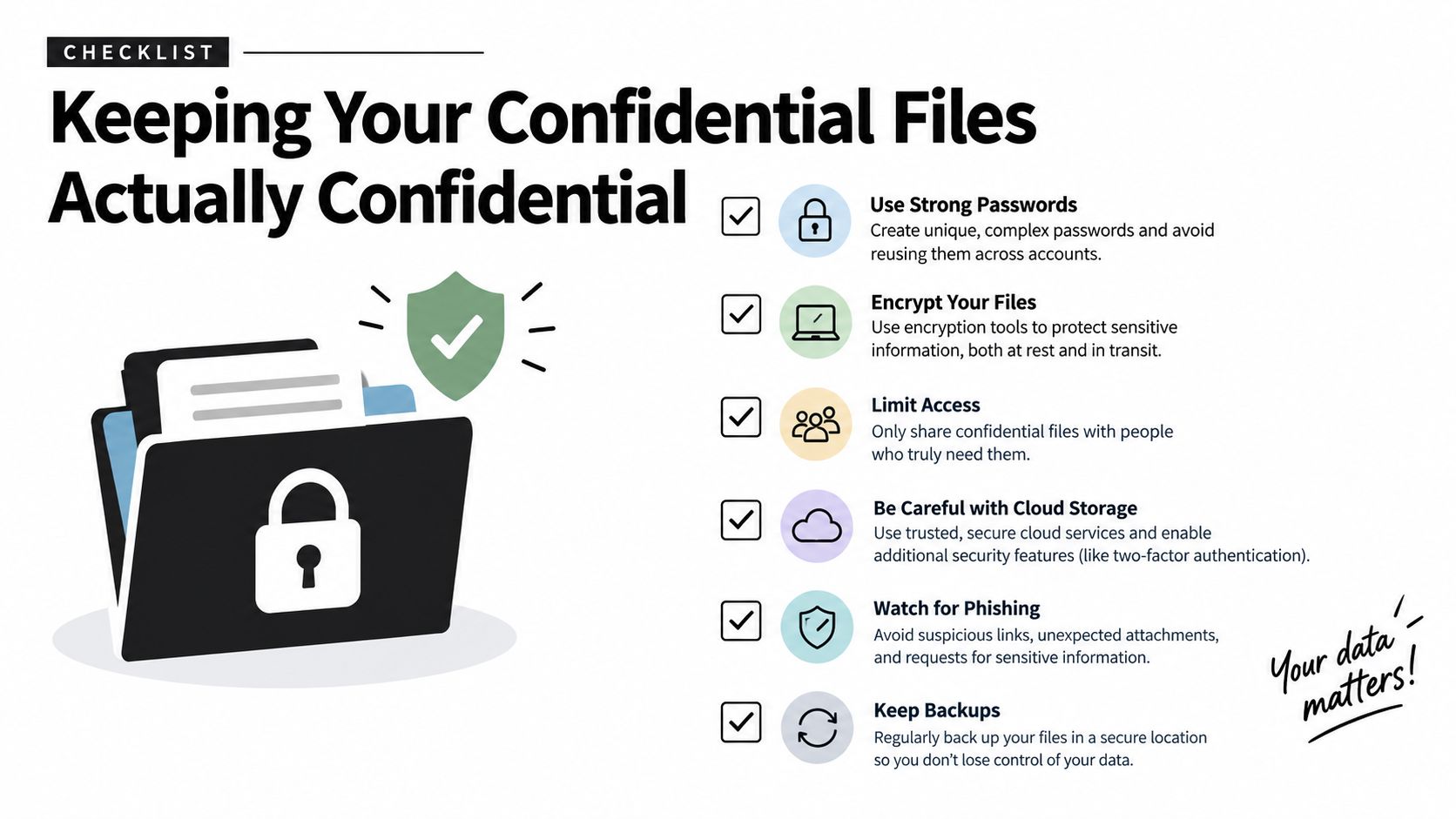
Use this short pre-upload checklist:
The best practices for documentation are useful beyond writing clean files. Good filenames, version information, headings, and explicit ownership make it easier for both people and retrieval systems to identify the right source.
The workflow that survives a busy Tuesday is deliberately boring. That's a compliment. You don't need a dramatic “AI transformation” every morning. You need a repeatable way to move from messy source material to a checked result.
Create a project for one task, topic, or decision. Add only the files relevant to that question, and include version information where it matters. A project containing an old specification beside a current one can be useful for comparison, but only if you tell the assistant what changed and which version should govern the answer.
Begin with orientation:
That first pass gives you a map. It also exposes bad ingestion early. If headings disappear, tables become nonsense, or the summary invents a section that doesn't exist, stop and fix the source set before asking more complicated questions.
Use narrow questions before broad ones. Ask for the exact clause, supporting evidence, assumptions, and implications separately. This makes it easier to catch where the assistant moves from extraction into interpretation.
Once you've checked the answer, choose an output that fits the next part of your day:
The AI workflow optimization guide can help you connect those stages without turning every task into a maze of disconnected apps. Zemith also includes a Smart Notepad for developing verified notes into polished writing, which keeps the useful separation between source evidence and your final interpretation.
Before exporting or sharing, review every consequential statement. Check the cited passage, confirm the document version, mark uncertainty, and remove any claim the files don't support. Then save the final notes with enough context that another person can understand where they came from.
Stanford's 2025 AI Index reports that a growing body of research finds AI can increase productivity and, in many cases, narrow performance gaps between lower- and higher-skilled workers. The practical benefit here comes from reducing repetitive reading and navigation while leaving judgment with the person doing the work.
The goal isn't to make your files chatty. It's to make them easier to interrogate, verify, remember, and use.
Zemith brings document chat, summaries, quizzes, flashcards, podcasts, research tools, and Smart Notepad into one workspace, so you can move from source files to checked, usable work without chasing information across tabs. Visit Zemith and build a document workflow that saves time while keeping evidence and privacy in view.


Trusted by teams at


The top models, plus image, video and voice tools, in one plan.
Without Zemith
ChatGPT PlusUS$20.00Claude ProUS$20.00Google AI ProUS$19.99SuperGrokUS$30.00Perplexity ProUS$20.00 MidjourneyUS$10.00
 ElevenLabsUS$6.00Le Chat ProUS$14.99
 RunwayUS$15.00Kling StandardUS$8.80
 Gamma PlusUS$12.00
 Otter ProUS$16.99
 QuillBot PremiumUS$19.95
 Photoroom ProUS$12.99
 Quizlet PlusUS$7.99
Total if paying separatelyUS$234.70/mo
"I love the way multiple tools they integrated in one platform. Going in the right direction."
— simplyzubair
"The quality of data and sheer speed of responses is outstanding. I use this app every day."
— barefootmedicine
"The credit system is fair, models are perfect, and the discord is very responsive. Quite awesome."
— MarianZ
"Just works. Simple to use and great for working with documents. Money well spent."
— yerch82
"The organization of features is better than all the other sites — even better than ChatGPT."
— sumore
"It lives up to the all-in-one claim. All the necessary functions with a well-designed, easy UI."
— AlphaLeaf
"The team clearly puts their heart and soul into this platform. Really solid extra functionality."
— SlothMachine
"Updates made almost daily, feedback is incredibly fast. Just look at the changelogs — consistency."
— reu0691
Hand off the research, writing, design and follow-ups. Zemith picks the tools it needs and brings back finished work.
Search the web, run deep research, read files, create images and run code with GPT, Claude, Gemini, Grok and more.
Zemith keeps working in the cloud and pings you when it's done.
Notion, Linear, Canva, Airtable and more. It asks before it creates or changes anything.
Docs, slides, sheets and PDFs, ready to send.
Chain models and tools on a visual canvas, from one prompt to a finished promo video.
Briefings, reports and reminders run on a schedule and are ready when you need them.
Real-time voice that can see your camera or screen.
The best image and video models, in one studio.
Turn PDFs, links and YouTube videos into podcasts, quizzes, flashcards and mind maps.






 Podcast
 Quiz
Quiz Flashcards
 Mind map
 Infographic