


Every top model, with tools built in.
Search the web, run deep research, read files, create images and run code with GPT, Claude, Gemini, Grok and more.
Explore 10 best ai prompts for coding, research, marketing, documentation, and learning, with practical tips for adapting each template in Zemith.
A good prompt isn't the longest prompt you can paste into a chat window. It's a small workflow. The strongest templates define the context, audience, constraints, desired output, and verification step, then leave room for refinement when the first answer misses the mark. Research on code-related tasks found that conversational, task-specific prompting improved code summarization, generation, and translation compared with automated strategies, which is a useful reminder that prompt design affects practical performance, not just writing style. The comparative evaluation also supports a simple principle: tell the model what success looks like, give it the material it needs, and make it prove the result is usable.
The 10 best AI prompts below apply that structure to content, research, coding, documentation, learning, marketing, and competitive analysis. None is a magic spell. Each works best when you adapt the inputs, output format, and review step to the job.
Zemith gives you a single workspace for testing different models, organizing source material, and refining outputs without juggling multiple subscriptions. That matters because the “best” prompt can change with the model, the modality, and the task. Your job isn't to find one perfect incantation. It's to build a repeatable process that produces useful work and catches confident nonsense before it reaches a customer.
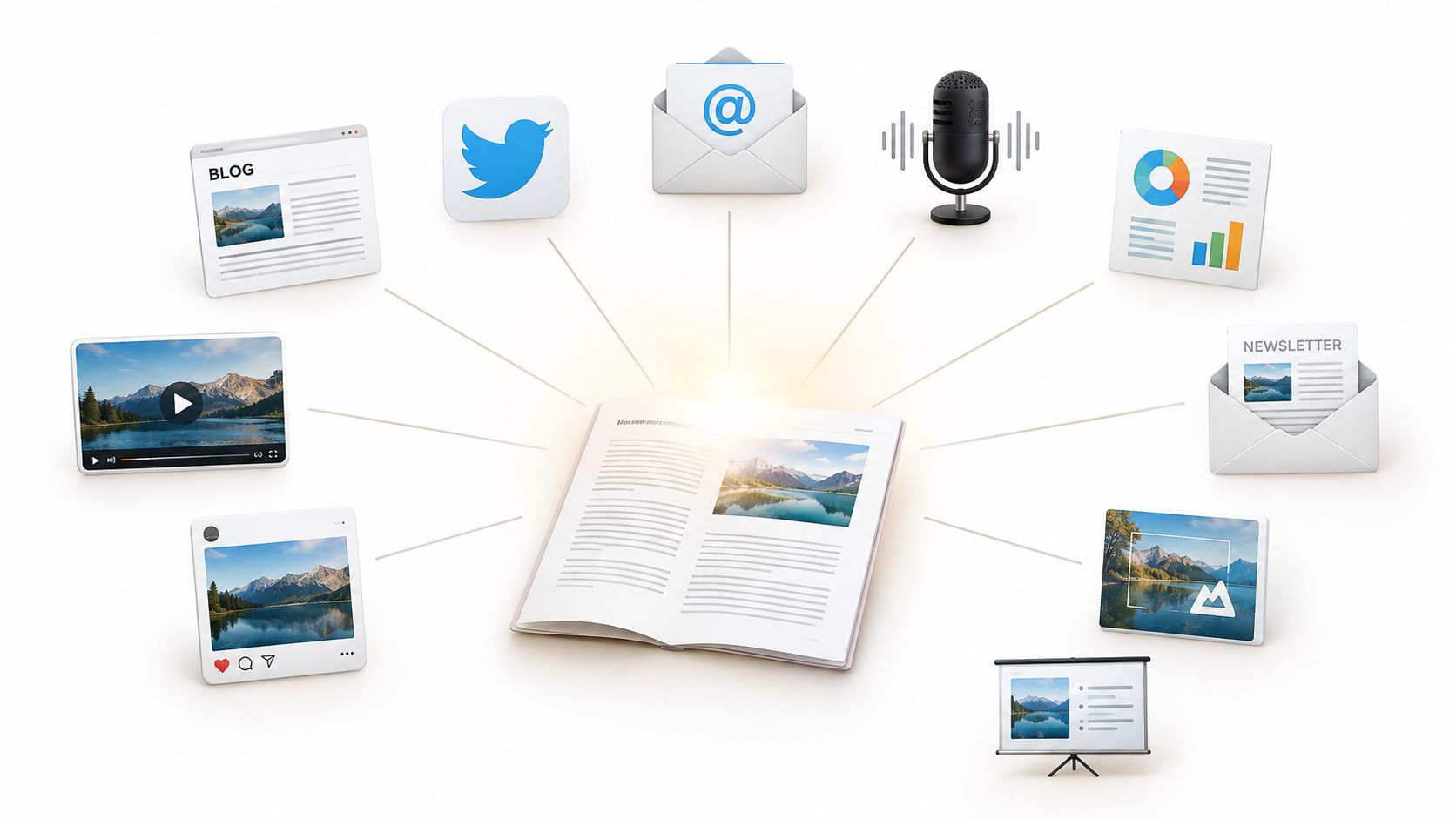
One strong source document can feed an entire content system, but only if you tell the AI how each asset should differ. A blog post, video transcript, or research paper shouldn't become the same paragraph wearing ten different hats.
Use this prompt:
Act as a senior content strategist. Using the source material below, extract the central argument, supporting evidence, examples, and practical takeaways. Create adaptations for [audience and platforms]. For each asset, include its purpose, recommended format, draft copy, source point used, and a review note identifying anything that needs human verification. Keep the original meaning intact, avoid unsupported claims, and match the brand voice described here: [voice guide]. Source material: [paste or attach document].
Ask for a LinkedIn post, a short social caption, an email newsletter, a podcast outline, an executive summary, and image-generation prompts as separate deliverables. Give every format its own audience and job. A technical insight for a developer shouldn't sound like an executive briefing, and a newsletter shouldn't read like a truncated white paper.
Zemith's Document Assistant can work from the original document, while Smart Notepad helps adjust phrasing and style. Store the source and approved adaptations in the Library so future drafts retain context instead of starting from a blank chat. For visual assets, generate a clear image brief alongside the copy, then adapt it for tools such as Flux 1.1 Pro Ultra.
A researcher could turn a white paper into LinkedIn posts, a newsletter, an executive summary, and a podcast outline. A founder could turn one product article into a family of social variations and an email sequence, but should still check every claim against the original.
Practical rule: Repurpose the argument, not just the sentences. If every platform receives the same wording, you haven't built a content system. You've created a copy-paste accident.
For a more detailed editorial workflow, see these content repurposing strategies.
Research prompts fail when they ask for “everything about” a topic. That instruction gives the model permission to collect trivia instead of answering a decision-worthy question.
Try this version:
Act as a research analyst investigating [specific question]. Define the scope, date range, geography, and terminology before searching. Gather primary and reputable secondary sources. Organize findings by claim, source, credibility, relevance, supporting evidence, opposing evidence, and practical implication. Flag contradictions, explain plausible reasons for them, and identify gaps. Do not present an unsupported claim as fact. End with a concise answer, open questions, and a source list.
A useful research output separates what a source says from what the model infers. Ask for direct links beside individual claims, not a pile of citations at the end. If the question involves changing products, competitors, or technical standards, require the model to state the publication date and distinguish current information from historical context.
Zemith's Deep Research capabilities support real-time web searches, fact-checking, and synthesis. Put the work in a Project so source material, follow-up questions, and revisions share a knowledge base. You can also compare responses from models such as Claude and Gemini. That won't guarantee correctness, but disagreement is a useful signal that a claim deserves closer inspection.
A developer researching web frameworks might request a comparison of architecture, documentation, maintenance, and trade-offs. A student researching AI ethics might ask for opposing viewpoints and unresolved questions rather than a tidy conclusion that pretends the debate is finished. For academic workflows, this guide to AI for academic research offers a useful starting point.
Don't let polished prose substitute for source quality. The model can summarize a weak source beautifully. Your review step should ask, “Does this source support the sentence beside it?”
“Fix my code” is a poor debugging prompt because it hides the behavior you expect, the behavior you got, and the boundaries the fix must respect. Give the model a reproducible problem and ask it to diagnose before rewriting.
Act as a senior software engineer and debugging partner. Review the code, error output, environment, dependencies, and reproduction steps below. First describe the observed failure. Then identify the most likely root cause, alternative causes, and the smallest safe fix. Return a patched version, explain each meaningful change, add tests for the reported failure and likely edge cases, and state what remains unverified. Preserve the public interface unless you explain why it must change. Code: [paste]. Error: [paste]. Expected behavior: [describe]. Actual behavior: [describe]. Environment: [include].
The prompt should produce more than a replacement code block. Request line-level reasoning, a test plan, readability improvements, and performance considerations separately. A fast patch that introduces a hidden regression is not a fix. It's a subscription to future debugging.
Zemith's Coding Assistant can help inspect code, explain failures, generate snippets, and provide live previews for supported React and HTML work. Run complex problems through more than one model, then compare the proposed root causes rather than voting for the answer with the nicest prose. Save useful debugging sessions in the Library as patterns your team can reuse.
A TypeScript developer might receive one explanation focused on a generic type mismatch and another focused on an avoidable performance issue. Those answers can both be useful, but only compilation, tests, and review establish whether the patch is safe.
The software-engineering benchmark described in this Scientific Reports study found that zero-shot prompting produced the highest average alignment among the tested strategies, while chain-of-thought wasn't consistently superior. The practical lesson is refreshingly unglamorous: start with a concise, well-scoped prompt and add complexity only when validation shows you need it.
For a focused walkthrough, read this guide to AI code debugging.
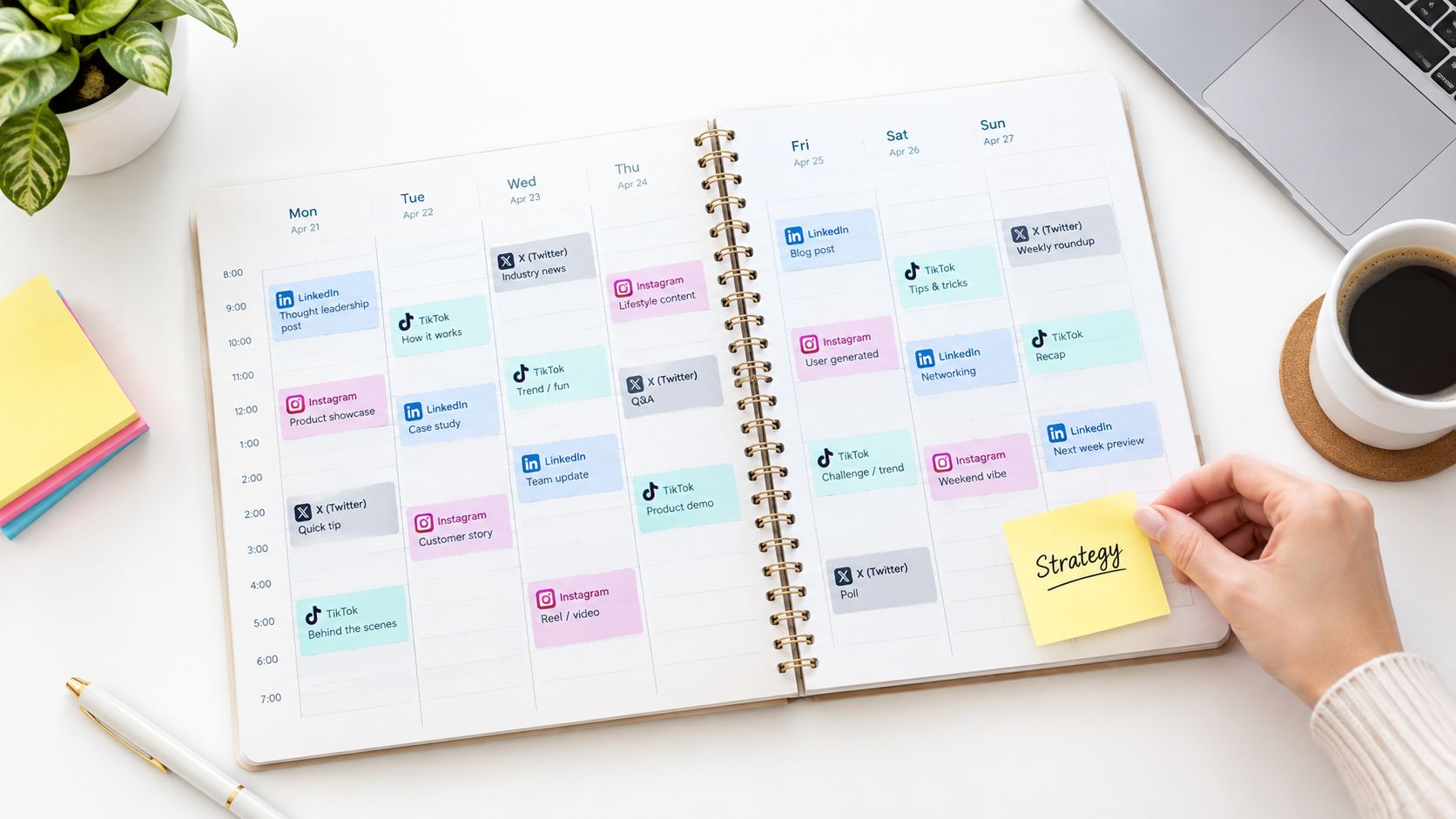
A social calendar built around random post ideas is just a spreadsheet with commitment issues. Strategy starts with the audience, the business goal, the platform's native behavior, and the gap competitors leave open.
Act as a social media strategist for [brand]. Analyze this niche, audience, existing presence, competitors, offer, and business goal: [details]. Recommend platform roles, content pillars, recurring formats, campaign angles, and a publishing calendar for [period]. For every idea, include the audience problem, hook, format, caption direction, call to action, visual brief, and measurement signal. Mark assumptions and avoid claiming a trend is current unless you can verify it.
LinkedIn thought leadership, product updates on X, TikTok behind-the-scenes content, Instagram Reels, and Pinterest visuals shouldn't share one universal caption. Ask the model to explain why each idea belongs on that platform. If the answer could be posted anywhere without editing, it probably isn't strategic enough.
Use specific audience information, including role, situation, objections, language, and buying context. Ask for competitor content gaps, but review them against live evidence. Zemith's Deep Research, Projects, and image tools can keep competitor notes, campaign ideas, draft calendars, and visual concepts together. That makes it easier to turn a finding into an actual asset instead of leaving it marooned in a research tab.
A B2B SaaS founder might assign LinkedIn to category education, X to product updates, and TikTok to process-led behind-the-scenes content. A freelancer might discover that visual tutorials deserve more attention than another generic service announcement. Those are hypotheses to test, not guarantees of reach.
Don't ask the AI to promise the “optimal posting time” unless you provide analytics or a reliable data source. Your own audience activity is more useful than a made-up universal schedule. Find more practical planning ideas in this social media strategy guide.
Email prompts often jump straight to clever subject lines. That skips the hard part, which is understanding what a subscriber knows, fears, wants, and needs to do next.
Use this workflow prompt:
Act as a lifecycle email strategist. Build a sequence for [product or service] that moves [audience] from [starting state] to [desired action]. Use these product facts, objections, proof points, constraints, and brand guidelines: [details]. Map each message to one stage. For every email, provide its objective, subject line alternatives, preview text, body copy, primary CTA, objection addressed, personalization fields, and review notes. Include ethical A/B test ideas that change one meaningful variable at a time. Do not invent testimonials, results, prices, or urgency.
A SaaS onboarding sequence might guide a new user toward a first successful feature use, then address friction before asking for deeper adoption. An ecommerce sequence might introduce a product, explain the benefit, handle objections, and follow up with useful information rather than shouting “last chance” at every opportunity.
List your top objections in the input. Ask the AI to distribute them across the sequence so every email has a job. Generate variations for subject lines, body copy, and CTAs, but don't launch every variation at once without a testing plan. Keep performance notes beside each version in Zemith's Library, then use the results to refine the next prompt.
Zemith can support the research, drafting, rewriting, and organization in one workspace. You can use Deep Research to understand customer language and industry context, then use Smart Notepad to bring the drafts closer to your brand voice.
Human review matters most around claims, customer proof, regulated language, and emotional pressure. AI can make an email sound persuasive while adding a promise nobody approved. Your compliance reviewer will enjoy that even less than your subscribers will.
Start with the production constraints: platform, audience, duration, visual resources, pacing, and the action viewers should take. Those inputs determine whether the script can survive recording and editing.
Act as a video producer and scriptwriter. Create a [educational, entertaining, or promotional] video for [platform] aimed at [audience]. The goal is [goal], the key message is [message], and the target duration is [duration]. Return a production-ready script with a hook, scene-by-scene visuals, dialogue or voiceover, pacing notes, on-screen text, B-roll, transitions, graphics, thumbnail concepts, and a final CTA. Provide alternative hooks and flag any claim that needs verification.
Give the prompt the footage and format it must support. A YouTube educator explaining React hooks needs room for examples, transitions, and screen captures. A TikTok creator needs a fast opening, one clear idea, and visual movement that reinforces the point. The topic can stay the same, while the structure, pacing, and shot list change.
Request conversational voiceover notes and several hook options. Choose one after comparing it with the footage you can produce and the promise made to the audience. Zemith's Creative Tools can draft thumbnail concepts and image briefs from the script, and a Project keeps approved versions alongside production notes.
Use a structured output so each production role knows what to do: timecode, spoken words, shot or B-roll, on-screen text, transition, and review flag. Ask the presenter whether the lines sound natural, the editor whether every visual is available, and the designer whether the graphics are specific enough to create without guessing.
Have the model compare titles against the platform, audience, promise, and search intent. It cannot know which title will perform best in advance. Review factual claims, select a feasible concept, then use viewer behavior to guide the next revision. The algorithm already has enough confident participants.
Technical documentation often answers how a system works while customers are still asking why they should care. A strong explainer prompt creates different versions from the same source, without flattening the technical truth.
Act as a product educator. Using the technical documentation below, explain [feature] for [specific audience role]. Preserve all factual details and flag ambiguous or missing information. Return a plain-language overview, the user problem solved, a step-by-step example, relevant limitations, an analogy from everyday life, FAQs, and a visual brief. Then create separate versions for an executive, an end user, and a developer. Do not promise outcomes that the source material doesn't support.
Start with the most complete documentation available. An executive version can emphasize business relevance, a user guide can emphasize successful use, and developer documentation can focus on interfaces and integration. They should differ in emphasis, not contradict one another.
Zemith's Document Assistant can work from technical material, while the Library keeps audience-specific explanations together. That makes updates less painful when a feature changes. Generate supporting diagrams or conceptual visuals with Zemith's creative tools, but have a subject-matter expert verify labels, flows, and terminology before publication.
A machine-learning SaaS might explain the same model to investors, customers, and integration partners. A fintech company might describe a settlement system in plain language for users, business value for executives, and implementation details for developers. Each audience needs a different doorway into the same room.
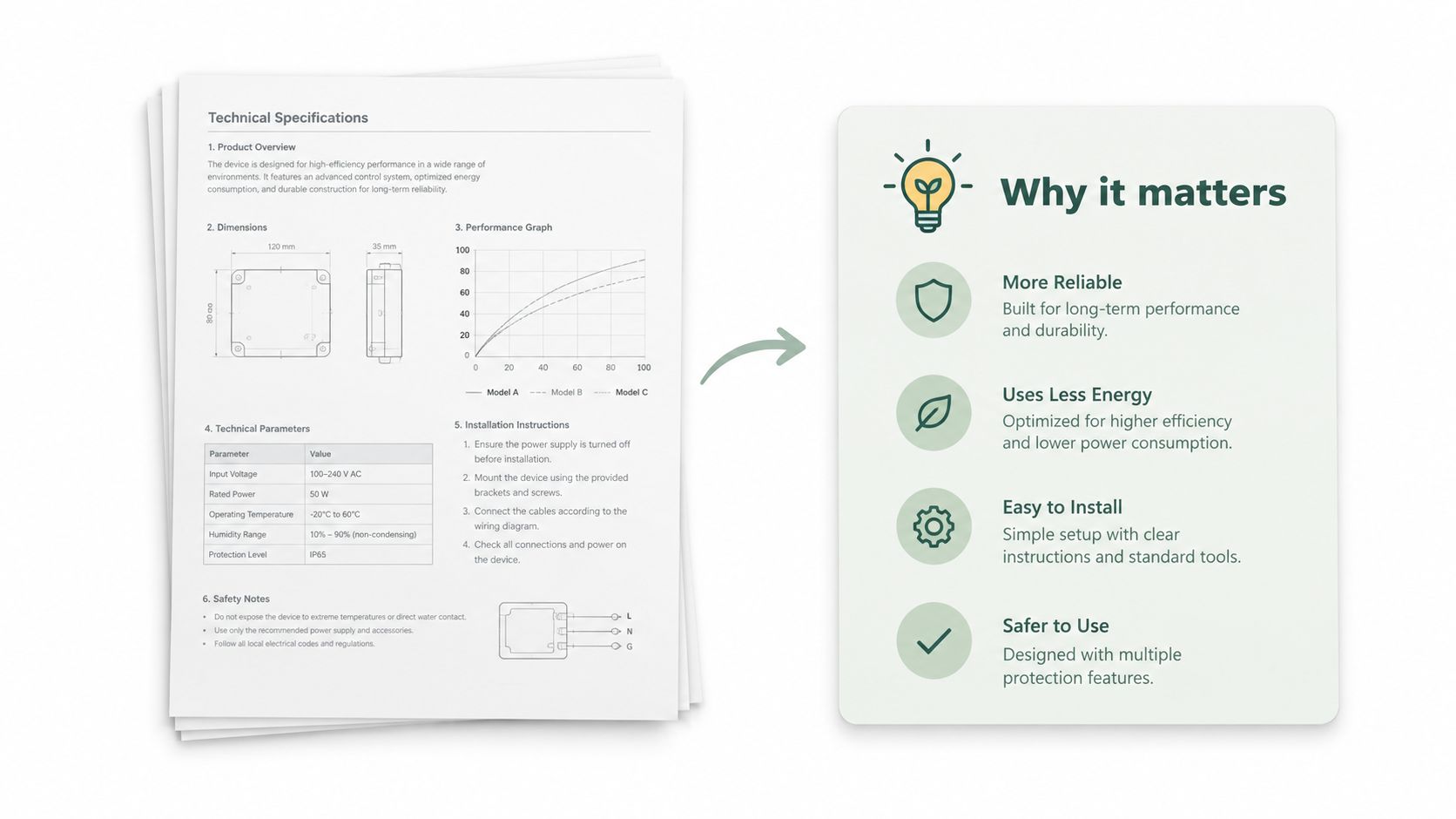
The best AI prompts for product explainers don't ask the model to “simplify everything.” They specify what must remain precise and what can become more accessible.
“Teach me Python” is a topic, not a learning plan. A useful prompt defines the learner's starting point, the capability they need to demonstrate, and the evidence that shows progress.
Act as an instructional designer. Build a learning path for [learner] who currently knows [starting assumptions] and needs to be able to [observable end state]. Respect these constraints: [time, tools, accessibility, role, and format]. Map prerequisites, modules, practice tasks, assessment points, common misconceptions, and progression criteria. Create separate activities for reading, watching, doing, and explaining. End each module with a short self-check and identify what the learner should do if they fail it.
A development onboarding path might move from architecture overview to a core module, hands-on coding, code review participation, and independent feature ownership. A React course might begin with JavaScript fundamentals, then progress through components, hooks, state, and side effects. The useful detail is the dependency between concepts, not the decorative order of a syllabus.
Ask Zemith's Document Assistant to turn approved material into quizzes and flashcards. Use a Project to organize curriculum documents and maintain a shared knowledge base. You can also create branching activities for visual, reading-based, and hands-on learners, but don't confuse different formats with different learning outcomes.
A prerequisite test prevents learners from being dropped into a lesson they can't yet use. A short assessment after practice reveals whether someone can perform the skill without the guide open beside them. Human instructors still need to inspect difficult misconceptions and adjust the path for real learners.
The prompt should also ask for a stopping rule. If a learner can't explain a concept or complete the practice task, the system should recommend review rather than enthusiastically proceeding to the next module.
Competitive analysis becomes noisy when the prompt asks for a generic SWOT analysis. Start with strategic questions and require evidence for every meaningful observation.
Act as a competitive intelligence analyst. Monitor [competitors] in [market] to answer these questions: [questions]. Compare positioning, product changes, pricing information, distribution, content themes, customer complaints, and emerging capabilities using current, attributable sources. Separate observed facts from interpretation. Return a competitor matrix, notable changes, unmet customer needs, strategic risks, opportunities, and recommended questions for further research. Include the date and source for each finding, and mark information that couldn't be verified.
A useful analysis shows what changed, why it might matter, and what you still don't know. A SaaS team might notice competitors introducing free tiers and then investigate whether that reflects packaging experimentation, acquisition pressure, or broader market movement. A product team might track a cluster of new AI features and use the evidence to prioritize roadmap questions.
Use Zemith's Deep Research for current source gathering and create a recurring Project for monthly or quarterly review. Store historical notes in the Library so a new report can distinguish a genuinely new move from a feature that has been present for months.
Ask the model to identify capabilities your product lacks, but don't treat a competitor's landing page as proof that the capability works well. Customer sentiment can reveal pain points, yet sentiment analysis also needs sampling context and human interpretation.
A good output helps a team decide what to investigate next. It doesn't pretend that a neat SWOT grid has eliminated strategic uncertainty.
A document audit prompt should behave less like a spellchecker and more like a reviewer with a defined standard. “Improve this document” is too vague to produce a defensible result.
Act as a document quality and compliance reviewer. Audit the material below against these standards, policies, audience requirements, and brand guidelines: [insert standards]. Check clarity, consistency, completeness, factual support, terminology, tone, accessibility, and applicable compliance requirements. Return findings in priority order with the exact passage, issue, reason, recommended revision, confidence level, and reviewer needed. Distinguish confirmed violations from questions for a qualified professional. Compare this document with the reference materials attached and flag inconsistent wording.
A healthcare team might review patient education materials for unclear terminology, accessibility issues, and applicable privacy requirements. A SaaS team might compare customer-facing documentation for consistent onboarding language and technical accuracy. In regulated work, the model can identify passages for review, but it isn't the final compliance authority.
Zemith's Document Assistant can review policies, technical specifications, marketing material, and other files. Organize batches in the Library, compare new documents with approved references, and use Projects to track revisions and unresolved questions. Include your actual brand guide or policy text in the prompt. Without it, the model can only guess what “consistent” means.
Ask for a severity level, source passage, proposed edit, and reason. That structure makes the output useful to an editor instead of producing a fog of general suggestions. For a practical document-review workflow, see this guide to AI document review.
A human reviewer should handle legal interpretation, medical claims, privacy decisions, and any material where an incorrect edit could cause harm. Good automation surfaces issues. It doesn't sign your name.
The best AI prompts aren't the cleverest ones. They're the ones that make a useful result repeatable.
Start with the role and goal. “Act as a content strategist” is only useful when it connects to an actual outcome, such as turning a source document into platform-specific assets or producing a research brief for a defined decision. Then provide source context. Attach the document, code, customer language, policy, analytics, or product details the model needs. A model can't recover context you never supplied, no matter how enthusiastically you add adjectives.
Specify the audience and the situation. “For marketers” is broad. “For a B2B SaaS founder comparing onboarding friction across competing products” gives the model something to work with. Constrain the format as well. Request fields such as objective, draft, evidence, assumptions, risks, and review notes when another person will need to approve the output.
Ask for alternatives when choice matters, but don't generate variations for the sake of filling a screen. Two distinctly different hooks, diagnoses, or positioning angles are more useful than a dozen cosmetic rewrites. Tell the model what should remain unchanged, especially in code, compliance documents, technical explanations, and research summaries.
Finally, add a review checklist. Require source links, unsupported-claim flags, contradiction checks, test cases, policy comparisons, or a clear “insufficient evidence” response. Prompting research has shown why this matters. In a study of ChatGPT judgments across repeated business-research hypotheses, the newer model reached overall accuracy of 80%, while chance-adjusted accuracy was about 60%; only 72.9% of cases were correct across all ten repeated prompts. The study report makes fluent one-shot answers look like a poor substitute for evaluation.
Model choice matters too. Few-shot examples can help when a format is specific, while elaborate reasoning scaffolds aren't automatically better for every task. Earlier program-synthesis research found that few-shot prompting enabled large models to solve 59.6% of MBPP problems without fine-tuning, and another evaluation reported 61.8% accuracy for zero-shot prompting compared with 69.6% for Chain-of-Thought with five-sample self-consistency. The research background supports an adaptive approach: start clear and simple, add examples when the format needs them, and use verification when the cost of error is high.
Save proven templates in Zemith's Prompt Gallery or Library. Compare outputs across models for high-stakes work, and revise prompts based on actual failures rather than chasing mysterious “perfect wording.” Test one prompt today on a real document, campaign, research question, or bug. Keep the source, output, review notes, and improved version together. That's how a prompt becomes a dependable workflow instead of another tab you'll forget to open.
For teams exploring content and automation with AI, that same principle applies beyond writing. Give the system context, make the output inspectable, and keep a person responsible for the decision.
Zemith brings document assistance, Deep Research, Smart Notepad, creative tools, coding support, multi-model comparison, Projects, Library, and Prompt Gallery into one workspace. Try one of the templates above on a real task, save the version that survives review, and visit Zemith to test the workflow without switching between separate AI tools.


Trusted by teams at


The top models, plus image, video and voice tools, in one plan.
Without Zemith
ChatGPT PlusUS$20.00Claude ProUS$20.00Google AI ProUS$19.99SuperGrokUS$30.00Perplexity ProUS$20.00 MidjourneyUS$10.00
 ElevenLabsUS$6.00Le Chat ProUS$14.99
 RunwayUS$15.00Kling StandardUS$8.80
 Gamma PlusUS$12.00
 Otter ProUS$16.99
 QuillBot PremiumUS$19.95
 Photoroom ProUS$12.99
 Quizlet PlusUS$7.99
Total if paying separatelyUS$234.70/mo
"I love the way multiple tools they integrated in one platform. Going in the right direction."
— simplyzubair
"The quality of data and sheer speed of responses is outstanding. I use this app every day."
— barefootmedicine
"The credit system is fair, models are perfect, and the discord is very responsive. Quite awesome."
— MarianZ
"Just works. Simple to use and great for working with documents. Money well spent."
— yerch82
"The organization of features is better than all the other sites — even better than ChatGPT."
— sumore
"It lives up to the all-in-one claim. All the necessary functions with a well-designed, easy UI."
— AlphaLeaf
"The team clearly puts their heart and soul into this platform. Really solid extra functionality."
— SlothMachine
"Updates made almost daily, feedback is incredibly fast. Just look at the changelogs — consistency."
— reu0691
Hand off the research, writing, design and follow-ups. Zemith picks the tools it needs and brings back finished work.
Search the web, run deep research, read files, create images and run code with GPT, Claude, Gemini, Grok and more.
Zemith keeps working in the cloud and pings you when it's done.
Notion, Linear, Canva, Airtable and more. It asks before it creates or changes anything.
Docs, slides, sheets and PDFs, ready to send.
Chain models and tools on a visual canvas, from one prompt to a finished promo video.
Briefings, reports and reminders run on a schedule and are ready when you need them.
Real-time voice that can see your camera or screen.
The best image and video models, in one studio.
Turn PDFs, links and YouTube videos into podcasts, quizzes, flashcards and mind maps.






 Podcast
 Quiz
Quiz Flashcards
 Mind map
 Infographic