How to Use AI to Write a Letter That Doesn't Sound Like a Robot
Discover how to ai write a letter with personality. Practical tips, prompts, and tools to craft authentic, human-sounding messages.
Ever asked an AI to write a letter and gotten something that sounds like it was written by a lawyer... for another lawyer? You're not alone. The truth is, AI is a brilliant assistant, but it’s a terrible mind-reader. It often spits out drafts that are technically correct but so hollow you could hear an echo.
This guide will show you how to stop getting robotic, soul-dead letters and start crafting authentic, human-like notes that actually connect.
Stop Sounding Like a Robot and Start Writing Better Letters
Let's be honest. Getting an AI to write a letter often feels like you’ve hired an overly eager intern who just discovered corporate buzzwords. The result is usually stiff, generic, and totally lacking any real personality. It sounds less like you and more like a legal disclaimer from the bottom of an email. Bleh.
But the problem isn't the AI—it's how we use it. Just hitting "generate" and hoping for the best is a surefire way to get robotic, soulless text. The real magic happens when you stop being a spectator and start being the director. You have to guide the AI, not just take dictation from it. Think of it less as a vending machine and more as a very literal, very powerful employee who needs clear instructions.
Why Most AI Letters Miss the Mark
Think about it: AI models are trained on a gigantic library of text from across the internet, which includes everything from Shakespeare to stereo instructions. Without clear directions, they play it safe, defaulting to a neutral and often way-too-formal tone. It’s like they’re terrified of offending anyone, so they end up sounding like nothing at all.
This leads to some classic AI writing fails:
- Vague Language: Kicking things off with clunky phrases like "I am writing to inform you" instead of just getting to the point.
- No Personality: The letter feels like it could have been written by anyone, for anyone. There's no you in it.
- Emotional Flatline: The text completely fails to get across genuine gratitude, real concern, or actual excitement. It's the text equivalent of a monotone voice.
A lot of people get stuck here, but a few simple tweaks to your process can make all the difference.
Common AI Writing Fails and How to Fix Them
Here's a quick look at why AI letters often miss the mark and the simple shifts you can make for genuinely better results.
By being more specific with your instructions, you're not just getting a letter; you're shaping a message that actually connects.
The goal isn't just to generate words; it's to communicate a feeling. An AI can assemble the sentences, but you must provide the emotional blueprint.
To make sure your AI-generated letters truly connect, it helps to understand . This is where an integrated tool like Zemith really shines. Instead of battling with a generic chatbot, you can use something like the Smart Notepad to instantly fix a clunky phrase or tweak the tone on the fly. It turns a frustrating chore into a smooth, creative collaboration.
Crafting the Perfect AI Prompt for a Letter
If your AI-generated letters sound like they were written by a bored robot, I have good news and bad news. The bad news? It's probably your prompt. The good news? That's incredibly easy to fix. The real secret to getting a great letter from an AI isn't the model you use—it's the quality of your instructions.
Think of it like ordering a pizza. If you just yell "Gimme a pizza!" into the phone, who knows what you'll end up with. Pineapple and anchovies? No, thank you. But if you ask for a large, thin-crust with pepperoni and extra cheese, you get exactly what you're craving. It's the same deal when you ask an AI to write a letter. Vague requests will always get you vague, generic results.
Moving Beyond "Write a Thank You Note"
To get a draft that actually sounds like you, you have to provide clear, detailed context. Forget simple commands. We need to tell the AI not just what to write, but how to write it. A fantastic framework for this is the RAFT method.
It’s a simple acronym that helps you remember the four pillars of a killer prompt:
- Role: Who is the AI pretending to be? (e.g., "Act as a friendly but professional project manager.")
- Audience: Who are you writing to? (e.g., "This letter is for a potential client who is interested but skeptical.")
- Format: What should the final output look like? (e.g., "A short, three-paragraph email.")
- Tone: What’s the emotional vibe we're going for? (e.g., "The tone should be confident, reassuring, and slightly informal.")
Using RAFT turns a weak, one-line request into a powerhouse instruction set. It gives the AI the specific guardrails it needs to stop it from defaulting to that stiff, corporate-speak it loves so much. For a deeper dive into the art of telling an AI what to do, you can learn more about the fundamentals of in our detailed guide.
Putting It All Into Practice with Zemith
Now for the fun part. Let's walk through how this works in a real-world scenario. Say you need to send a firm but polite complaint letter about a faulty product. A bad prompt would be something like: "Write a complaint letter about a broken coffee machine."
You'll get a bland, cookie-cutter response that sounds like a template from the 90s. Instead, let's inject some RAFT details.
Example Prompt: "Act as a frustrated but polite customer. You are writing to the support department of 'Brewtiful Mornings Inc.' The format is a concise email, no more than four paragraphs. The tone should be firm, clear, and disappointed, but not angry. I purchased their 'Espresso Pro X' model on May 15th, order #12345. It stopped working after two weeks, and I want a full refund as per their 30-day guarantee."
See the difference? We’ve given the AI a character to play, a specific audience to address, a clear structure to follow, and a precise emotional direction. This is exactly the kind of detailed instruction that produces a letter that feels human and, more importantly, gets results.
This is also where a tool like Zemith becomes your secret weapon. You don’t have to cook these up from scratch every time. The Prompt Gallery in Zemith is packed with battle-tested formulas just like this for all sorts of situations—from job application follow-ups to networking requests. You can just grab a template, plug in your details, and have a high-quality draft in seconds. It’s like having a cheat code for better writing.
Moving from First Draft to Final Polish with Zemith
Alright, you've nailed the prompt and have a decent first draft from the AI. High five! Now what? This is where the real work begins—turning that raw, slightly generic AI output into something polished, professional, and genuinely you. So many people get stuck here, but this is exactly where an integrated tool like Zemith starts to shine.
Getting that first draft is often the easy part. The heavy lifting is in the refinement, and that used to mean juggling a dozen browser tabs for fact-checking, rephrasing, and digging up supporting data. It was a chaotic, copy-paste mess. Let's change that chaotic process into a single, smooth editing session.
Instantly Audition Different Tones and Styles
First things first, get that AI-generated draft into Zemith’s Smart Notepad. Just think of the Notepad as your personal editing sandbox—a place where you can experiment freely without worrying about messing up your original text.
With your text loaded up, just highlight any sentence or paragraph that doesn't quite feel right. Maybe it’s a little too stiff and formal, or maybe it sounds like you’re trying way too hard to be buddy-buddy. A single click on the ‘rephrase’ or ‘style adjustment’ tools lets you instantly see different options. It’s like having a team of copywriters on call, ready to give you five different ways to say the same thing until one just feels perfect.
For a deep dive into making your writing sparkle, check out our guide on ; it's full of practical tips.
Power Up Your Letter with Data and Research
Okay, let's kick this letter up a notch. A well-placed statistic or a key piece of data can make your message so much more convincing. This is where Zemith’s Document Assistant and Deep Research features come in, saving you from tumbling down the rabbit hole of endless Google searches.
Let's say you're drafting a performance review letter and need to pull in last quarter's results.
- Actionable Tip with Document Assistant: Upload the Q3 company report and ask the assistant something like, "Pull key stats about our team's growth from this report and summarize them for my performance review letter." Boom. It finds and extracts the exact numbers you need, saving you from having to skim a 30-page PDF.
- Actionable Tip with Deep Research: Need to double-check a claim or find an industry benchmark to add some weight to your point? Use the research tool right there in your workspace. Ask it to "find a recent statistic about customer retention in the SaaS industry," and it will deliver the goods without you ever having to leave the page.
Getting the foundation right starts with the prompt, and this chart breaks down the key ingredients for that.
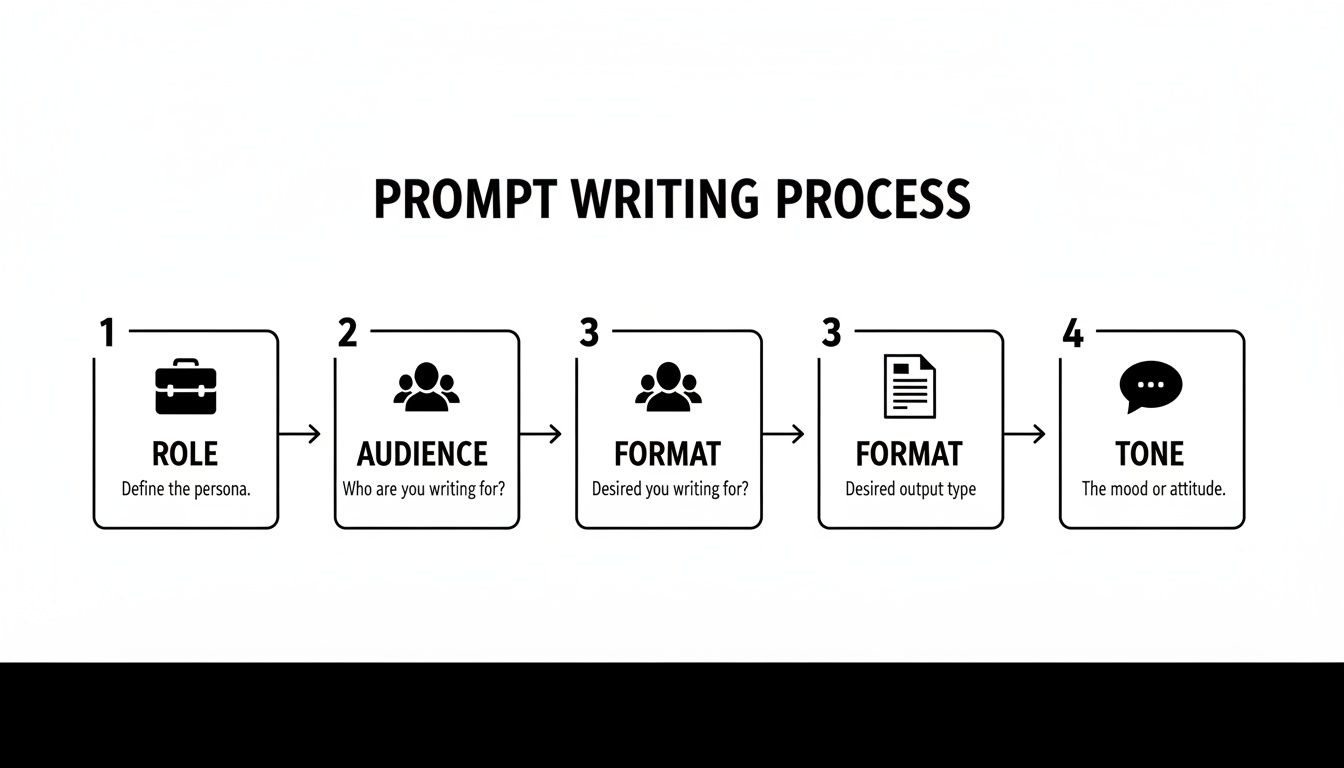
This visual shows how thinking through the Role, Audience, Format, and Tone gives the AI the context it needs to create a much stronger starting point for you to polish.
By pulling your editing and research into one cohesive workflow, you’re not just saving time—you’re creating a more powerful and persuasive final letter. You stop the constant context-switching and start building real momentum.
This kind of seamless integration is what makes a great tool stand out. It’s all about turning the tedious parts of writing into an efficient, creative flow, letting you focus on what really matters: the message. This is how you truly master the art of having an AI write a letter that still sounds completely, authentically human.
Why Your Human Touch Is the Secret Ingredient
Let's be real for a second: even the smartest AI can't fake a soul. You've prompted, you've refined, and now you have a technically perfect letter. But it’s still missing the most important part—you. This final step is where you transform the AI's competent draft into a message that truly connects.
When you ask an AI to write a letter, it's just assembling words based on patterns it's seen a million times before. It has no access to your shared history with the person you're writing to, the inside jokes you both find hilarious, or the specific emotional weight behind your words. The AI builds the car, but you're the one who has to get in and drive it.
Weaving Your Personality into the Draft
This is your moment to make the letter undeniably yours. People can spot an overly polished, impersonal message from a mile away. Trust is built on authenticity, not perfection.
Here’s how to inject that crucial human element:
- Add a Specific Anecdote: Instead of a generic "I appreciate your help," try something real. "I'm so grateful for your help last week—I was totally lost until you explained that spreadsheet."
- Reference a Shared Memory: Swap a bland "It was great seeing you" for "It was great seeing you at the game on Saturday. I'm still thinking about that last play!"
- Tweak Phrases to Sound Like You: If the AI writes "I wish to express my gratitude," but you'd actually say "I just wanted to say a huge thank you," make the change. A great trick is to read it aloud. If it feels weird coming out of your mouth, rewrite it.
The Risk of Outsourcing Your Brain
It's tempting to hit "generate" and call it a day, but there's a hidden cost to letting the AI do all the work. Researchers call it "cognitive offloading," which is a fancy way of saying we're letting the tech do our thinking for us. Don't let your brain get lazy!
A telling study from MIT found that students using AI for essays showed lower brain activity and couldn't recall their own work as well. Even worse, human reviewers scored those AI-assisted pieces lower on creativity and individuality. You can dig into more of these findings in this breakdown of . This is exactly why your personal touch is non-negotiable.
Use AI for the heavy lifting, but never let it have the final say. Your personality is the one thing that will make your letter stand out from a sea of perfectly crafted but soulless messages.
Think of this editing process as a fantastic way to sharpen your own communication skills. As you tweak and personalize, you're actively thinking about your audience and what you truly want to say. For more strategies on this, our guide on how to offers some really practical advice. The goal is to make the technology work for you, amplifying your voice instead of replacing it.
Understanding the AI Writing Boom
Remember when AI writing tools felt like a clunky science experiment? You’d ask one to write a letter, and it would spit out something so bizarre it was practically unusable. It feels like overnight, they went from being a quirky novelty to a genuinely powerful assistant for all sorts of writing tasks. You’re not just imagining it.
This massive leap forward happened because the underlying technology—large language models—finally crossed a critical quality threshold. The output became coherent, context-aware, and reliable enough for real, professional work.
The Market Surge Explained
This isn't just a gut feeling; the numbers are pretty wild. The market for AI writing assistants is on a tear, jumping from $5.2 billion in 2023 to a projected $18.8 billion by 2025. That's a staggering 260% increase in just a couple of years.
What’s driving this? Widespread adoption. A whopping 74% of marketers, for instance, are now using AI writing tools every single day for everything from brainstorming to drafting entire scripts.
For someone using a platform like Zemith, this boom is fantastic news. It means the tech you’re using isn't some beta test. It's part of a mature, powerful ecosystem that millions of professionals now depend on to stay competitive. You're not just using a tool; you're leveraging a global shift in how work gets done.
Why This Matters When You Ask an AI to Write a Letter
Okay, so the industry is growing. What does that actually mean for you when you just want to ai write a letter? A lot, actually. You now have more power and flexibility than ever before.
- You get more choices. Platforms like Zemith offer different AI models for different jobs. Need a quick, no-fuss draft? A model like GPT-3.5-mini is your go-to. Writing something that needs a bit more nuance or a sophisticated tone? Claude 3 Sonnet is probably a better fit. Having choices means you can pick the right tool for the job.
- The AI is more reliable. As these models get smarter, they make fewer silly mistakes. They understand your instructions better the first time, which saves you a ton of time on editing.
- It’s a real productivity skill. With so many people using these tools, knowing how to get the most out of them is no longer just a neat trick. It's becoming a fundamental skill for getting work done efficiently.
Understanding this context is key. You're not just randomly clicking buttons; you're directing a sophisticated assistant that's part of a huge technological shift.
To see the bigger picture, it's worth keeping an eye on the , which show just how deeply this tech is changing content creation. For a closer look at the different options out there, check out our guide to the best . The more you know about the landscape, the smarter your choices will be.
Got Questions About How an AI Writes a Letter? Let's Talk.
So, you've seen what AI can do, but a few questions are probably still bouncing around in your head. That’s completely normal. Using an AI to write a letter can feel a bit like stepping into the future, and it definitely has its own learning curve.
Let's tackle some of the most common questions I get asked. My goal is to clear things up so you can start using these incredible tools with confidence.
Is It Ethical for an AI to Write a Letter for Me?
I get this one a lot. The short answer? Yes, absolutely—as long as you’re being transparent and honest.
Think of an AI writing assistant as a turbocharged brainstorming partner. It's there to help you organize your thoughts, get past writer's block, and structure your ideas. The ethical gray area appears when you try to pass off the AI's work as entirely your own, with zero input.
Drafting a cover letter or a tricky apology with AI is a great starting point. But the crucial next step is making it yours. You have to inject your voice, your specific stories, and those little details that only you know.
The AI gives you the clay; you're the one who has to sculpt it. The final letter is a team effort, but the genuine, human touch has to come from you. Never claim a 100% AI-generated letter is your own original thought, especially in academic or professional settings where that stuff really matters.
Can an AI Really Write a Great Cover Letter?
It can definitely help you write the start of a great one. This is one of the best ways to beat that "blank page" anxiety. A tool like is brilliant for this. Just feed it the job description, and it can whip up a draft that hits all the key qualifications and industry buzzwords. It gives you a fantastic foundation to build on.
But here’s the catch: a hiring manager can spot a generic, AI-written cover letter from a mile away, and it's a one-way ticket to the "no" pile. You absolutely must weave in your own personality and specific wins. Talk about that one project you're proud of or a measurable result you delivered that an AI could never invent. Tailor the tone to what you’ve learned about the company's vibe.
What's the Biggest Mistake People Make When They Let an AI Write a Letter?
Easy. It's what I call the "prompt and publish" trap. This is when someone gets a response from the AI, gives it a quick scan, and immediately hits send. Honestly, this is a recipe for disaster.
Relying on the first draft leads to letters that are bland, impersonal, and sometimes contain flat-out wrong information or weird AI "hallucinations." The only way to do this right is to treat the AI's output as raw material. I can't stress this enough: always, always review, edit, and personalize. The first draft is just the beginning.
The boom in AI has had a wild effect on writing everywhere. One analysis, for example, found a mind-boggling 376% spike in new authors publishing ten or more letters to the editor in their first year—a surge that lined up perfectly with AI's explosion in popularity. It shows how much faster we can write, but it also shines a light on the need for authenticity. You can read more about it in .
Ready to stop sounding like a robot and start writing letters that actually connect with people? Zemith pulls all the tools you need—from a Smart Notepad for quick ideas to a Document Assistant for deeper work—into one clean workspace. It’s time to ditch the copy-paste chaos and find a smarter way to write.
Explore Zemith Features
Every top AI. One subscription.
ChatGPT, Claude, Gemini, DeepSeek, Grok & 25+ more


Always on, real-time AI.
Voice + screen share · instant answers
What's the best way to learn a new language?
Immersion and spaced repetition work best. Try consuming media in your target language daily.
Voice + screen share · AI answers in real time
Image Generation
Flux, Nano Banana, Ideogram, Recraft + more

Write at the speed of thought.
AI autocomplete, rewrite & expand on command
Any document. Any format.
PDF, URL, or YouTube → chat, quiz, podcast & more
Video Creation
Veo, Kling, Grok Imagine and more

Text to Speech
Natural AI voices, 30+ languages
Code Generation
Write, debug & explain code
Chat with Documents
Upload PDFs, analyze content
Your AI, in your pocket.
Full access on iOS & Android · synced everywhere
Your infinite AI canvas.
Chat, image, video & motion tools — side by side

Save hours of work and research
Transparent, High-Value Pricing
Trusted by teams at


Free
No credit card required
- 100 credits daily
- 3 AI models to try
- Basic AI chat
Plus
- 1,000,000 credits/month
- 25+ AI models — GPT, Claude, Gemini, Grok & more
- Agent Mode with web search, computer tools and more
- Creative Studio: image generation and video generation
- Project Library: chat with document, website and youtube, podcast generation, flashcards, reports and more
- Workflow Studio and FocusOS
Professional
- Everything in Plus, and:
- 2,100,000 credits/month
- Pro-exclusive models (Claude Opus, Grok 4, Sonar Pro)
- Motion Tools & Max Mode
- First access to latest features
- Access to additional offers
What Our Users Say
Great Tool after 2 months usage
"I love the way multiple tools they integrated in one platform. Going in the right direction."
— simplyzubair
Best in Kind!
"The quality of data and sheer speed of responses is outstanding. I use this app every day."
— barefootmedicine
Simply awesome
"The credit system is fair, models are perfect, and the discord is very responsive. Quite awesome."
— MarianZ
Great for Document Analysis
"Just works. Simple to use and great for working with documents. Money well spent."
— yerch82
Great AI site with accessible LLMs
"The organization of features is better than all the other sites — even better than ChatGPT."
— sumore
Excellent Tool
"It lives up to the all-in-one claim. All the necessary functions with a well-designed, easy UI."
— AlphaLeaf
Well-rounded platform with solid LLMs
"The team clearly puts their heart and soul into this platform. Really solid extra functionality."
— SlothMachine
Best AI tool I've ever used
"Updates made almost daily, feedback is incredibly fast. Just look at the changelogs — consistency."
— reu0691