


Every top model, with tools built in.
Search the web, run deep research, read files, create images and run code with GPT, Claude, Gemini, Grok and more.
Compare today's top AI image generator models by quality, speed, and price, plus prompts, licensing, and how Zemith puts them all in one workspace.
You're halfway through a hero illustration, and your browser looks like a control room. One tab handles faces, another gives you the painterly style you want, a third is faster for rough concepts, and a fourth might finally spell the product name correctly. The fifth tab is open because you've forgotten which one produced the version your client liked.
That's the awkward reality of AI image generator models today. The interface matters, but the model underneath it usually determines the things you care about most: visual fidelity, prompt accuracy, speed, cost, editing behavior, and whether the resulting asset is sensible for commercial use. The prettiest demo isn't automatically the right production choice.
This guide treats model selection like a creative-director decision, not a beauty contest. We'll look at the three tradeoffs that matter in real work, quality, speed, and commercial safety, then map major model families to briefs such as product mockups, concept art, social graphics, and batch production.
A designer named Maya has a simple brief: create a launch image for a coffee brand. She needs a realistic ceramic cup, a warm morning scene, a small printed logo, and enough empty space for campaign copy. Her first model creates a beautiful image but mangles the logo. The second handles the product shape better but takes too long for quick variations. The third produces excellent typography, although the scene looks more like a stock photo than a brand world.
Maya isn't really choosing between three websites. She's choosing between three different model behaviors.
That distinction gets lost because most AI products wrap models in similar-looking prompt boxes. The button might say Generate in every tab, but the engine behind it can have very different strengths. One model may follow spatial instructions closely, another may produce more appealing composition by improvising, and a third may be designed for flexible customization rather than immediate polish.
Practical rule: Choose the model for the brief first, then choose the interface that makes testing and editing easy.
A mismatch creates practical waste. A marketing team can burn credits asking a slow, high-fidelity model for dozens of rough thumbnails. A concept artist can spend an afternoon trying to force a photoreal model into a loose editorial illustration style. A startup can publish an attractive asset before checking whether its provenance and usage terms fit a client campaign.
The useful comparison isn't “Which generator is number one?” It's “Which model gives this team the right result with the least friction?” A broader AI model comparison becomes much more useful when it connects benchmark performance to the actual job.
For every model family, ask three questions:
Those questions also explain why model leaderboards need caution. A tiny quality advantage may not justify extra wait time or cost in a production pipeline. Conversely, a fast model may become expensive in human time if every output needs heavy repair.
The right model is the one that helps you finish the brief, not the one that wins a screenshot contest.
You don't need a computer-science degree to understand the main model families. Think of image generation as a thermostat trying to reach a target temperature. Your prompt describes the target, and the model repeatedly adjusts its current state until the result is close enough.
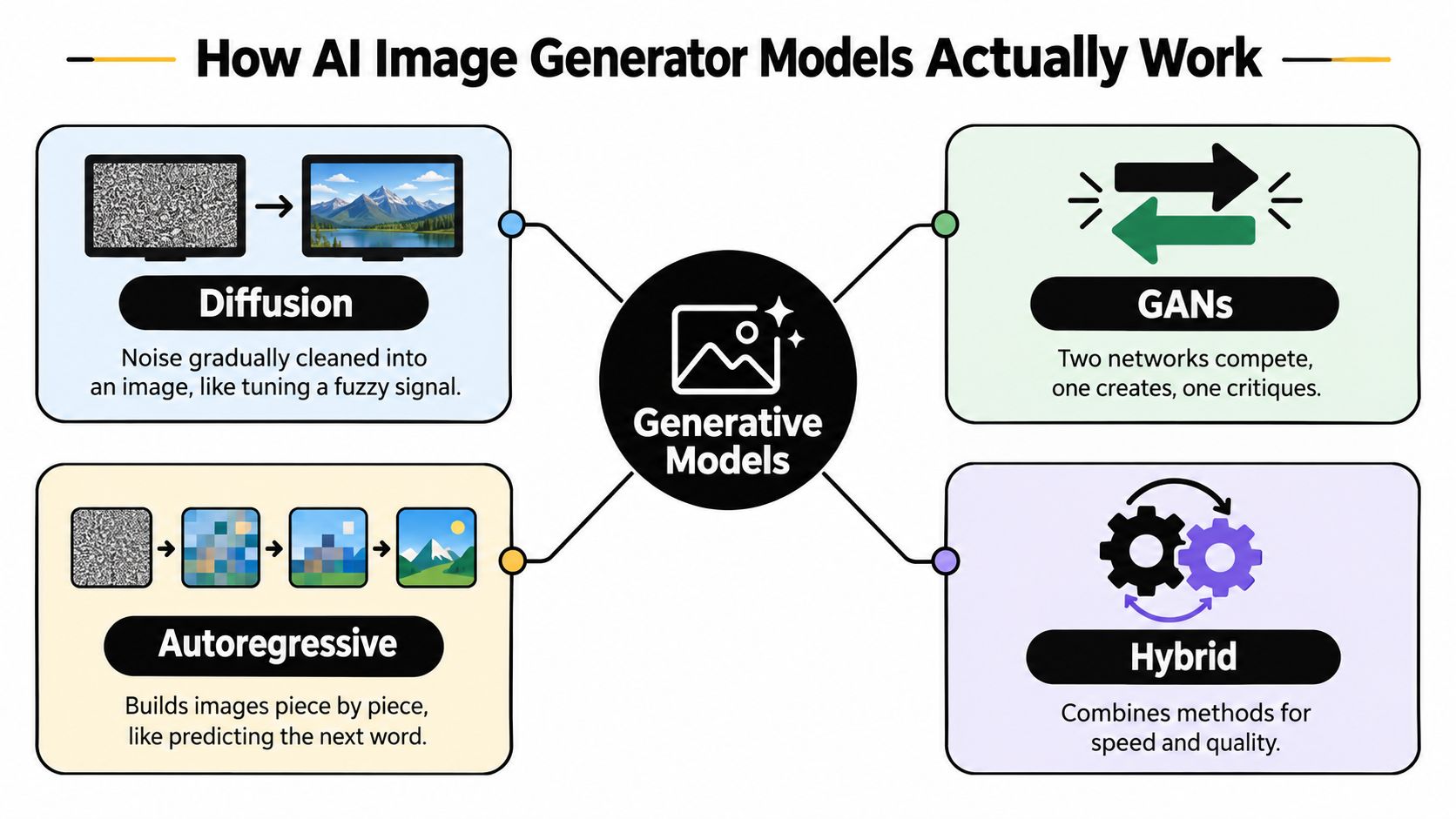
A diffusion model starts with visual noise, similar to a television showing static. It gradually removes the noise through a sequence of denoising steps, guided by the text prompt and other conditions such as a reference image or composition map.
The thermostat analogy is simple. If the room is far too cold, the system makes larger corrections. As it approaches the requested temperature, the adjustments become more careful. In image generation, those repeated corrections shape rough forms into subjects, lighting, textures, and details.
Diffusion models are popular because they can produce strong visual variety and work well with controls such as inpainting, image-to-image generation, and custom fine-tuning. Their weakness is that “close enough” doesn't always mean “obedient.” A prompt can request three chairs in exact positions and receive an attractive room with two chairs and a mysterious extra stool.
Generative adversarial networks, or GANs, use two networks. One creates an image, while the other evaluates whether it resembles the training examples. The creator improves by trying to fool the critic.
It's like a forger and detective locked in an unusually productive argument. GANs became known for convincing faces and sharp visual outputs, although they can be less flexible for open-ended text prompts than newer systems.
Autoregressive systems build an image sequentially, much like a language model predicts the next word in a sentence. Instead of cleaning the whole canvas at once, they predict the next visual token or patch based on what has already been established.
This approach can support detailed reasoning about relationships and instructions, but the generation process may behave differently from diffusion and may have different speed or resolution tradeoffs. Transformer-based designs often appear in this family or alongside other methods.
Hybrid systems combine techniques. One component may handle broad composition, another may refine details, and another may improve text or editing. Many modern products also work in a latent space, a compressed mathematical representation where the model can manipulate meaning without processing every raw pixel at every stage.
You don't need to memorize the architecture names. You do need to remember the consequence: a model that creates convincing photographic faces may struggle with a flat graphic style, exact typography, or unusual object relationships. Training-data variety and alignment also shape what the system can generate reliably.
For a practical explanation of turning source material into reusable visuals, this AI template creation tool is a useful companion. And if your starting point is an existing picture rather than a blank prompt, image-to-image generation uses a different set of controls and decisions.
A model family has a personality. Flux tends to appeal to people who want flexibility and control. Stable Diffusion has a large customization ecosystem. Midjourney is often chosen for its recognizable, painterly visual direction. Imagen is a natural candidate for polished photorealism, while GPT Image and DALL-E are useful when instruction precision and editable concepts matter.
Those descriptions aren't hard laws. Each family includes versions, interfaces, settings, and integrations that change the experience. Treat them as starting points for testing, not permanent labels.
The comparison below uses practical categories rather than declaring one universal winner.
A 2026 multi-metric comparison illustrates why a single score can mislead. In one aggregated dataset, GPT Image 1.5 high scored 99.3, with about 42.1 seconds per image and roughly $0.13 per image, while Google Nano Banana 2 scored 98.6, with about 26.5 seconds per image and roughly $0.07 per image. The comparison is available in the image generation model leaderboard, and its practical lesson is more useful than the ranking itself: small quality differences can come with meaningful latency and cost differences.
The model with the highest visual score may be the wrong choice if your team needs hundreds of rough directions before lunch.
Text rendering deserves its own test. A model can understand your headline perfectly and still produce a poster where one letter has wandered off to join a different alphabet. Benchmarks such as STRICT focus specifically on accurate, instruction-aligned, and multilingual text inside images, because general image quality scores can hide this failure mode.
The same applies to composition. T2I-CompBench++ evaluates attribute binding, object relationships, generative numeracy, and complex compositions through 8,000 compositional prompts. That's closer to a real design review than asking whether an image feels attractive at a glance.
Start with the deliverable, not the model's reputation. A brainstorming board and a packaging mockup can both begin with text, but they punish different mistakes. The board needs volume and variety. The packaging mockup needs legible copy, stable object placement, and materials that don't look like melted plastic.
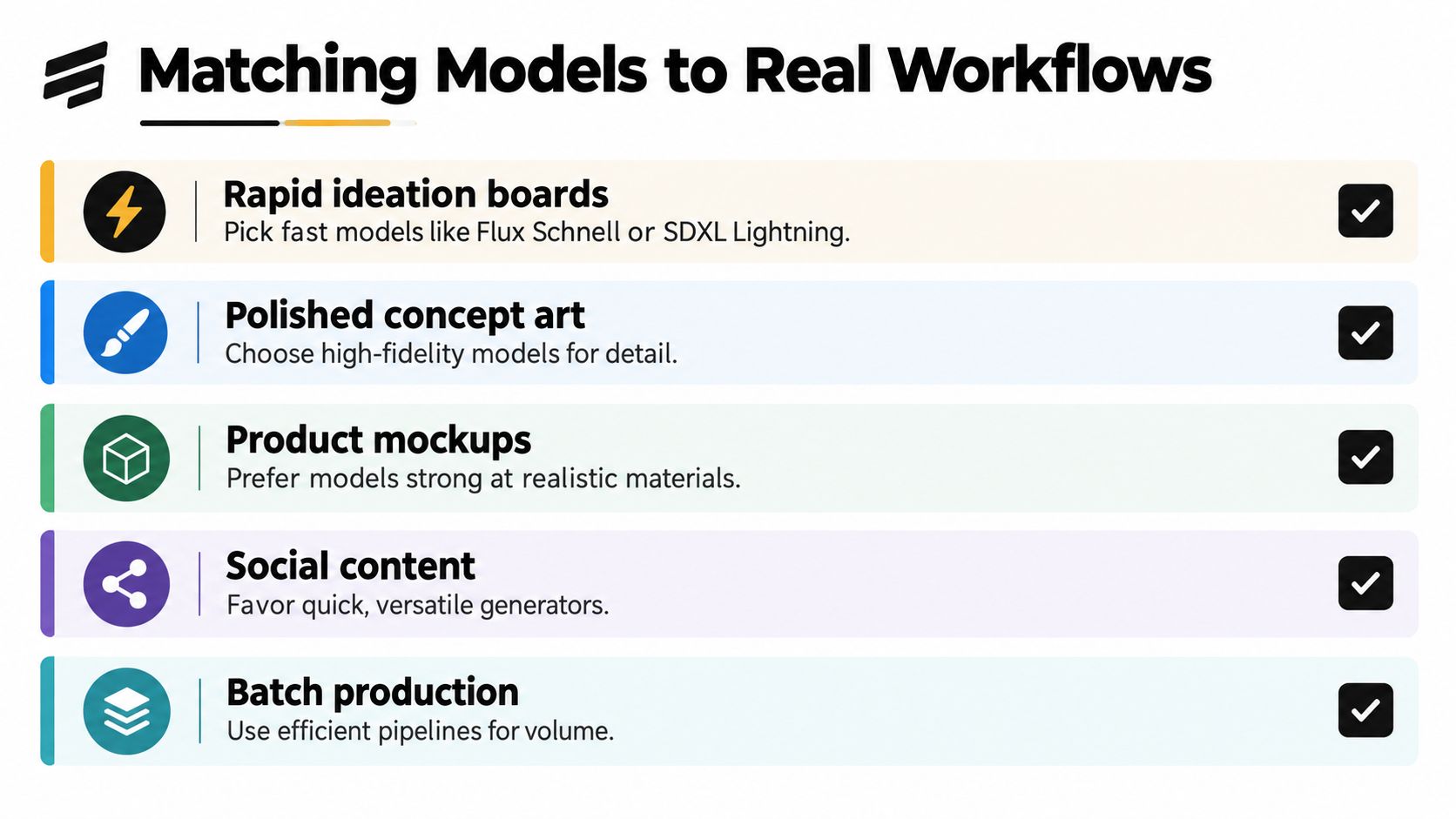
For rapid ideation boards, start with fast options such as Flux Schnell or SDXL Lightning. They're useful when the question is “Which direction feels right?” rather than “Is this the final pixel-perfect asset?”
Generate rough variations, keep the promising compositions, and move only those finalists to a higher-fidelity model. This prevents you from spending premium generation time polishing an idea that your team will reject five minutes later.
Polished hero art often benefits from a model chosen for detail and visual finish. Midjourney v6 can suit stylized concept work, while Imagen 3 is a reasonable candidate when photoreal finish matters. Don't assume either will solve every brand requirement automatically. A beautiful image with the wrong visual identity is still the wrong image.
Product-on-white shots and instruction-heavy mockups need a different bias. GPT Image or DALL-E 3 may be more useful when you need the model to understand placement, product attributes, or an editing request. For text-heavy posters, thumbnails, and packaging concepts, test a typography-focused option such as Ideogram, then inspect every word at full size.
For editing, background replacement, generative fill, and object removal, a workspace with image tools can reduce the number of exports and handoffs. The AI image generator and editor workflow is relevant when generation and cleanup happen in the same project.
Ask these five questions before you generate:
Pick a default and a fallback. That small decision is better than opening every model and calling it research.
A portable prompt has a clear anatomy. Begin with the subject, then specify the action, setting, style, lighting, and camera or lens. Add composition, aspect ratio, color direction, and any metadata-style modifiers the chosen model supports.
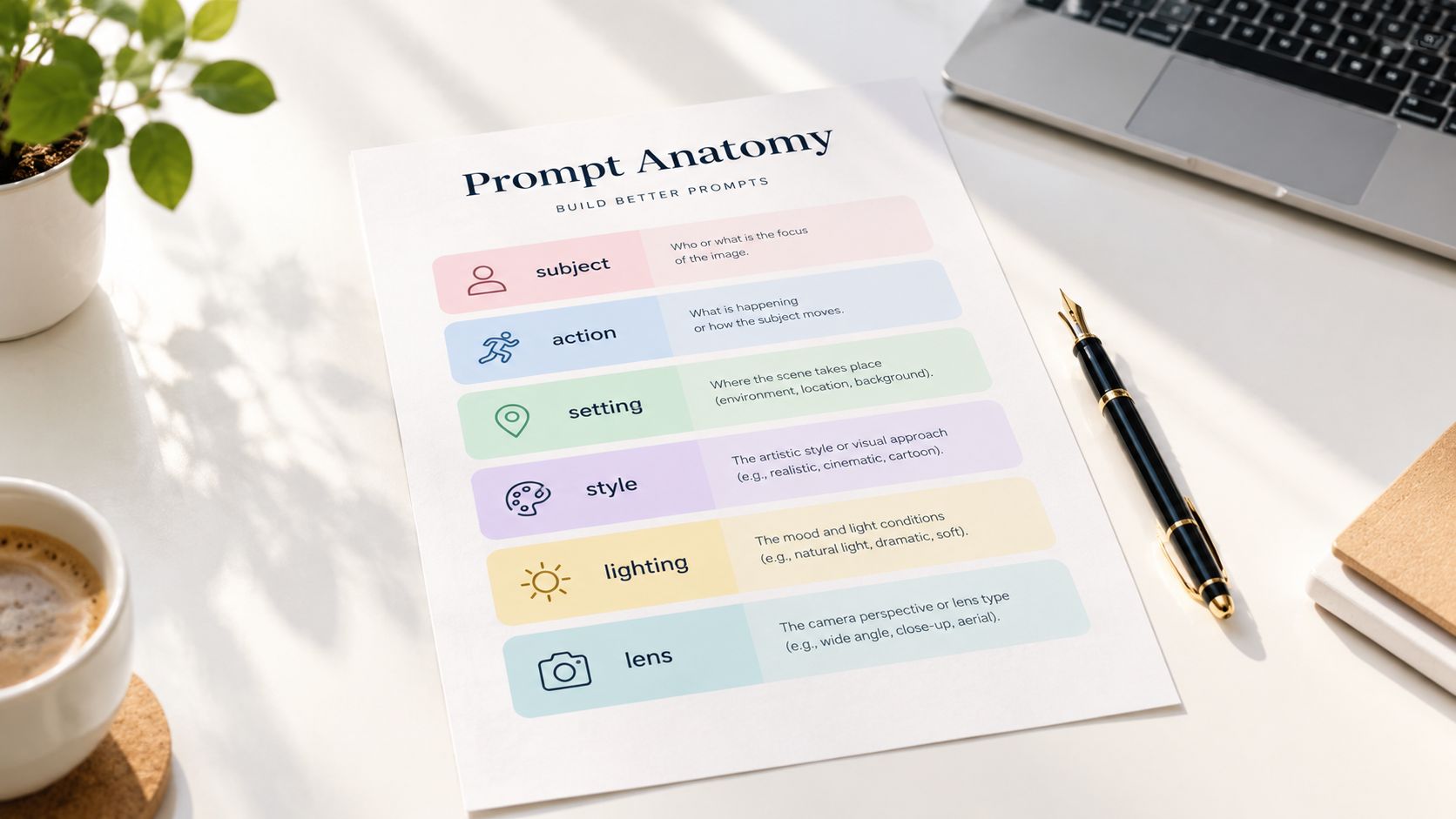
Compare these two prompts:
a coffee shopcozy indie cafe, morning light through window, 35mm lens, shallow depth of field, candid, warm tones --ar 16:9The second gives the model more handles to follow. It defines the place, time, mood, camera language, focus behavior, color, and layout. Midjourney, Flux, and SDXL will still interpret it differently, yet each receives a clearer brief. That makes the prompt portable even when the image result is not identical.
Place the main subject and action near the beginning. Follow them with the visual treatment, then add details that refine the scene. If a logo, product shape, or character identity matters, state that priority plainly. Use a reference image or editing control when the model provides one.
Negative prompts require model-specific judgment. Open workflows such as Stable Diffusion may offer dedicated negative-prompt fields and weights. Closed models such as DALL-E may interpret natural-language instructions another way, so a long list of “no extra fingers, no blur, no text errors” does not function as a universal control panel.
A 2025 benchmark found that structured metadata in prompts improved output quality across multiple model families, using measures including Weighted Score, CLIP-based similarity, LPIPS, FID, and retrieval measures. The benchmark on structured metadata for text-to-image generation supports a practical habit: treat prompt details as production metadata, not decorative adjectives.
Prompt habit: Save the prompt that produced the winner, not only the image. The wording is part of the asset.
Teams checking an image for synthetic artifacts can use a guide to visual forensics for AI art to sharpen the inspection step.
Here's a short demonstration of how prompt structure and model behavior can affect the output:
Keep a reusable template with slots for subject, action, environment, style, lighting, lens, aspect ratio, and brand constraints. See more ai-image-prompt-examples for reusable structures. Change one group at a time, so you can identify which adjustment fixed the composition. Zemith can keep these experiments in one workspace across model families, reducing the tool-switching tax when speed, fidelity, or a different interpretation matters. Save each winning prompt with its model and settings, or the next revision becomes guesswork.
A model can produce a gorgeous image and still create a poor business decision. Commercial safety includes more than whether a tool lets you download a file. You also need to understand the provider's current output terms, training-data position, provenance signals, client obligations, and the risks attached to recognizable people, logos, and living artists' styles.
The legal baseline is especially important in the United States. Current independent coverage notes that purely AI-generated images generally don't receive copyright protection without meaningful human authorship, while providers take different approaches to provenance credentials, visible watermarks, and watermarking that users may not notice. The generative AI trust and safety guide explains why a model's visual ranking doesn't answer the commercial question by itself.
Adobe Firefly and Google Imagen are often discussed in the context of licensed or public-domain training approaches, but teams should still verify the current terms and any indemnity conditions before promising protection to a client. DALL-E output rights, Midjourney commercial permissions, and Stable Diffusion licensing can depend on the product tier, deployment method, base model, and fine-tune involved.
That makes a simple universal table impossible without flattening important differences. Use this as a due-diligence map, then open the provider's current terms for the exact workflow.
C2PA credentials and SynthID-style systems can help document origin, but provenance isn't the same as copyright ownership. Keep the prompt, source references, edits, model version, and approval record with the project.
A conservative workflow also flags celebrity likenesses, brand logos, and prompts that imitate a living artist's recognizable style. The safest model for a large brand may not be the most photogenic model on a leaderboard. A legal review, a human design contribution, and a documented asset trail can matter more than one extra layer of visual polish.
The hidden cost of model experimentation is context switching. You move between subscriptions, recreate prompts, download files, rename variations, and then try to remember which version used which settings. Eventually, someone chooses the model whose tab is already open. That's not a creative decision. That's browser-based inertia.
A unified workspace changes the question from “Which website should I open?” to “Which model fits this brief?” In Zemith, Flux, Stable Diffusion, Imagen, GPT Image, DALL-E, and Midjourney can sit in the same working environment, allowing a team to compare directions without rebuilding the whole process across separate tools.
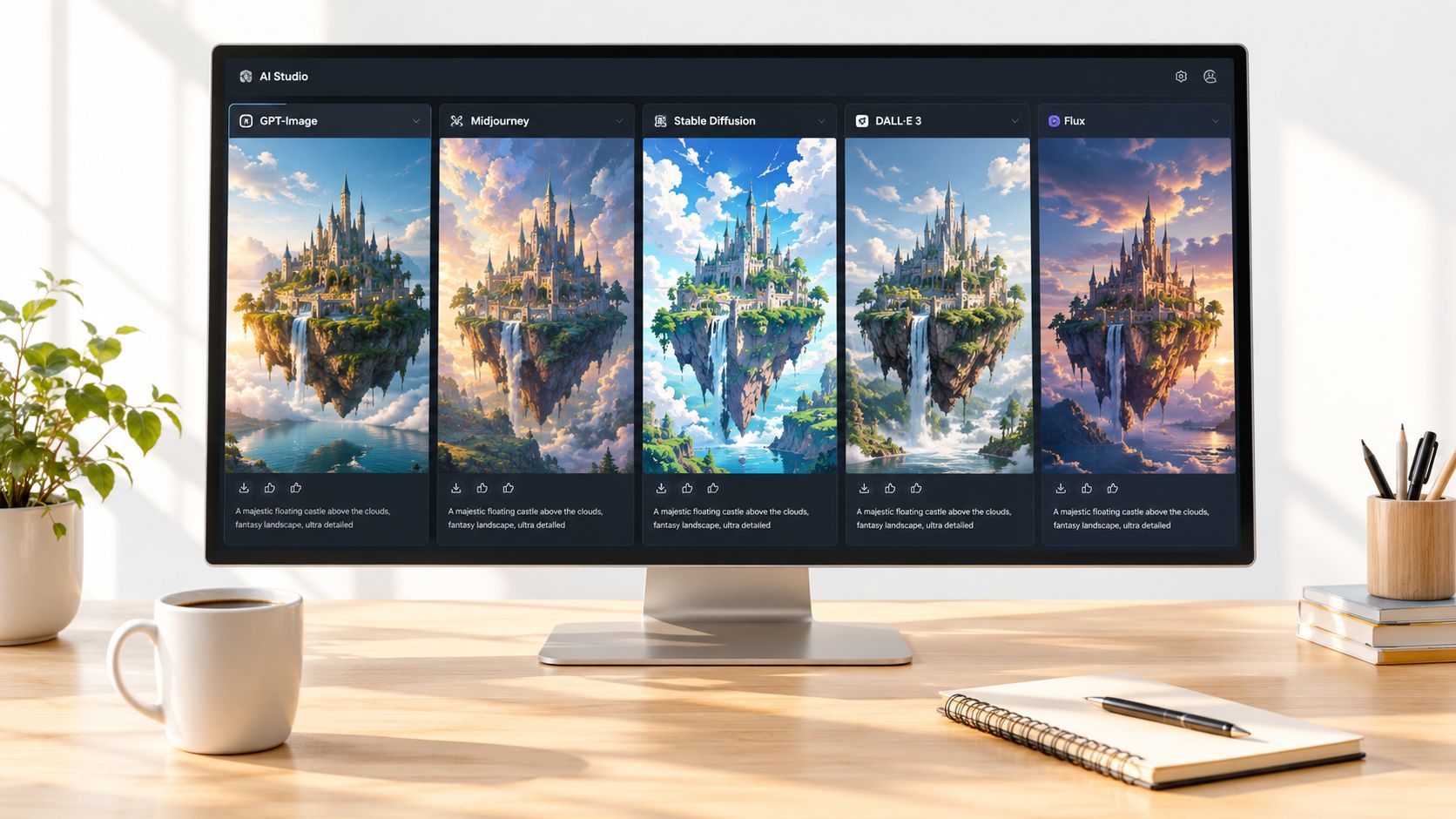
The practical advantage isn't only model access. Image tools such as upscaling, inpainting, background removal, background replacement, object removal, and generative fill keep common corrections close to the generation step. A prompt gallery can preserve the input that worked, while a Library and shared history give reviewers a place to compare outputs and record why one direction survived.
Workflow test: If a teammate can't find the winning prompt or reproduce the preferred direction, the process isn't finished.
A multi-model workspace won't remove the need for judgment. You still need to check typography, anatomy, brand consistency, licensing, and provenance. It can remove the tool-switching tax that makes those checks harder to perform consistently.
For a broader view of how model consolidation affects creative work, see this guide to AI image generator platforms. The goal is simple: one project context, several model choices, fewer lost files, and a reusable record of what worked.
Use this routine on your next brief.
hero-art, product-shot, or typography-test.After one focused session, you should have a default model, a fallback, a reusable prompt structure, and notes about the tradeoff that decided the winner. That's a working pipeline, not another collection of browser tabs.
Zemith brings multiple AI image generator models, image editing tools, prompt reuse, and organized project history into one workspace, so you can test the model against the brief instead of testing your patience against five subscriptions. Visit Zemith to compare workflows, keep stronger outputs together, and build a repeatable image production process.


Trusted by teams at


The top models, plus image, video and voice tools, in one plan.
Without Zemith
ChatGPT PlusUS$20.00Claude ProUS$20.00Google AI ProUS$19.99SuperGrokUS$30.00Perplexity ProUS$20.00 MidjourneyUS$10.00
 ElevenLabsUS$6.00Le Chat ProUS$14.99
 RunwayUS$15.00Kling StandardUS$8.80
 Gamma PlusUS$12.00
 Otter ProUS$16.99
 QuillBot PremiumUS$19.95
 Photoroom ProUS$12.99
 Quizlet PlusUS$7.99
Total if paying separatelyUS$234.70/mo
"I love the way multiple tools they integrated in one platform. Going in the right direction."
— simplyzubair
"The quality of data and sheer speed of responses is outstanding. I use this app every day."
— barefootmedicine
"The credit system is fair, models are perfect, and the discord is very responsive. Quite awesome."
— MarianZ
"Just works. Simple to use and great for working with documents. Money well spent."
— yerch82
"The organization of features is better than all the other sites — even better than ChatGPT."
— sumore
"It lives up to the all-in-one claim. All the necessary functions with a well-designed, easy UI."
— AlphaLeaf
"The team clearly puts their heart and soul into this platform. Really solid extra functionality."
— SlothMachine
"Updates made almost daily, feedback is incredibly fast. Just look at the changelogs — consistency."
— reu0691
Hand off the research, writing, design and follow-ups. Zemith picks the tools it needs and brings back finished work.
Search the web, run deep research, read files, create images and run code with GPT, Claude, Gemini, Grok and more.
Zemith keeps working in the cloud and pings you when it's done.
Notion, Linear, Canva, Airtable and more. It asks before it creates or changes anything.
Docs, slides, sheets and PDFs, ready to send.
Chain models and tools on a visual canvas, from one prompt to a finished promo video.
Briefings, reports and reminders run on a schedule and are ready when you need them.
Real-time voice that can see your camera or screen.
The best image and video models, in one studio.
Turn PDFs, links and YouTube videos into podcasts, quizzes, flashcards and mind maps.




 Podcast
 Quiz
Quiz Flashcards
 Mind map
 Infographic